evollu / evollu/react-native-fcm
Getting Java Exception in "NativeModules
- Dominant language
- Java
- Stars
- 1.7k
- Forks
- 661
- PR merge metrics
- No merged PRs in 30d
Description
all of sudden I am not able to run my react-native project nither older commit
when I am debugging the app with the command
`gradlew assembledebug`
i am getting build success
but when i run with react-native run-andoid i am getting belloe error
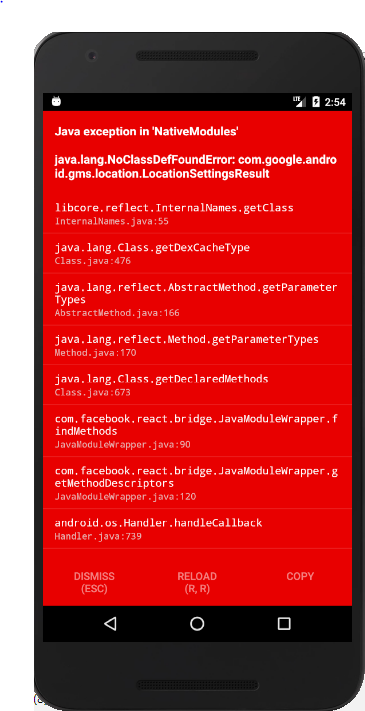
i have also tried adding in {yourApp}/android/app/build.gradle (answer from simmilar issue #283)
compile "com.google.android.gms:play-services-auth:11.2.0"
but still same issue
at bottom of the error screen its showing node_module directory
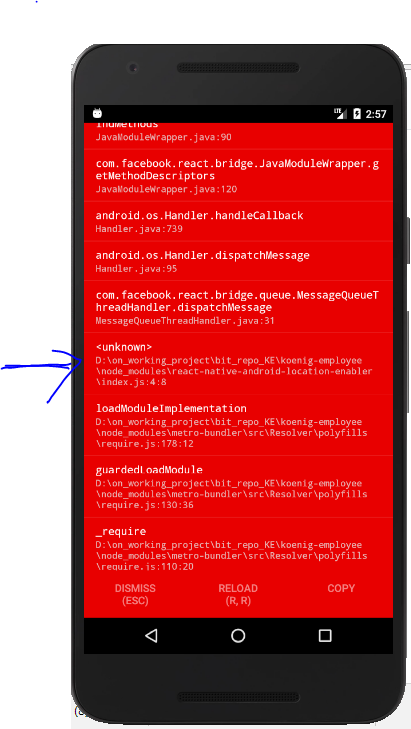
so its may be node module error
i have add my package.json ,both build.gradle file please let if any other info require
**PROJECT INFO**
// Top-level build file where you can add configuration options common to all sub-projects/modules.
```
{MyApp}/android/build.gradle
buildscript {
repositories {
jcenter()
}
dependencies {
classpath 'com.android.tools.build:gradle:2.2.3'
classpath 'com.google.gms:google-services:3.0.0'
// NOTE: Do not place your application dependencies here; they belong
// in the individual module build.gradle files
}
}
allprojects {
repositories {
mavenLocal()
jcenter()
maven {
// All of React Native (JS, Obj-C sources, Android binaries) is installed from npm
url "$rootDir/../node_modules/react-native/android"
}
}
}
```
{MYAPP}/android/app/build.gradle
```
apply plugin: "com.android.application"
apply plugin: 'com.google.gms.google-services'
import com.android.build.OutputFile
/**
* The react.gradle file registers a task for each build variant (e.g. bundleDebugJsAndAssets
* and bundleReleaseJsAndAssets).
* These basically call `react-native bundle` with the correct arguments during the Android build
* cycle. By default, bundleDebugJsAndAssets is skipped, as in debug/dev mode we prefer to load the
* bundle directly from the development server. Below you can see all the possible configurations
* and their defaults. If you decide to add a configuration block, make sure to add it before the
* `apply from: "../../node_modules/react-native/react.gradle"` line.
*
* project.ext.react = [
* // the name of the generated asset file containing your JS bundle
* bundleAssetName: "index.android.bundle",
*
* // the entry file for bundle generation
* entryFile: "index.android.js",
*
* // whether to bundle JS and assets in debug mode
* bundleInDebug: false,
*
* // whether to bundle JS and assets in release mode
* bundleInRelease: true,
*
* // whether to bundle JS and assets in another build variant (if configured).
* // See http://tools.android.com/tech-docs/new-build-system/user-guide#TOC-Build-Variants
* // The configuration property can be in the following formats
* // 'bundleIn${productFlavor}${buildType}'
* // 'bundleIn${buildType}'
* // bundleInFreeDebug: true,
* // bundleInPaidRelease: true,
* // bundleInBeta: true,
*
* // whether to disable dev mode in custom build variants (by default only disabled in release)
* // for example: to disable dev mode in the staging build type (if configured)
* devDisabledInStaging: true,
* // The configuration property can be in the following formats
* // 'devDisabledIn${productFlavor}${buildType}'
* // 'devDisabledIn${buildType}'
*
* // the root of your project, i.e. where "package.json" lives
* root: "../../",
*
* // where to put the JS bundle asset in debug mode
* jsBundleDirDebug: "$buildDir/intermediates/assets/debug",
*
* // where to put the JS bundle asset in release mode
* jsBundleDirRelease: "$buildDir/intermediates/assets/release",
*
* // where to put drawable resources / React Native assets, e.g. the ones you use via
* // require('./image.png')), in debug mode
* resourcesDirDebug: "$buildDir/intermediates/res/merged/debug",
*
* // where to put drawable resources / React Native assets, e.g. the ones you use via
* // require('./image.png')), in release mode
* resourcesDirRelease: "$buildDir/intermediates/res/merged/release",
*
* // by default the gradle tasks are skipped if none of the JS files or assets change; this means
* // that we don't look at files in android/ or ios/ to determine whether the tasks are up to
* // date; if you have any other folders that you want to ignore for performance reasons (gradle
* // indexes the entire tree), add them here. Alternatively, if you have JS files in android/
* // for example, you might want to remove it from here.
* inputExcludes: ["android/**", "ios/**"],
*
* // override which node gets called and with what additional arguments
* nodeExecutableAndArgs: ["node"],
*
* // supply additional arguments to the packager
* extraPackagerArgs: []
* ]
*/
project.ext.react = [
entryFile: "index.js"
]
apply from: "../../node_modules/react-native/react.gradle"
/**
* Set this to true to create two separate APKs instead of one:
* - An APK that only works on ARM devices
* - An APK that only works on x86 devices
* The advantage is the size of the APK is reduced by about 4MB.
* Upload all the APKs to the Play Store and people will download
* the correct one based on the CPU architecture of their device.
*/
def enableSeparateBuildPerCPUArchitecture = false
/**
* Run Proguard to shrink the Java bytecode in release builds.
*/
def enableProguardInReleaseBuilds = false
android {
compileSdkVersion 23
buildToolsVersion "23.0.1"
defaultConfig {
applicationId "***************"
minSdkVersion 16
targetSdkVersion 22
versionCode 56
versionName "2"
ndk {
abiFilters "armeabi-v7a", "x86"
}
}
signingConfigs {
release {
if (project.hasProperty('***************')) {
storeFile file(***************)
storePassword ***************
keyAlias ***************
keyPassword *************
}
}
}
splits {
abi {
reset()
enable enableSeparateBuildPerCPUArchitecture
universalApk false // If true, also generate a universal APK
include "armeabi-v7a", "x86"
}
}
buildTypes {
release {
minifyEnabled enableProguardInReleaseBuilds
proguardFiles getDefaultProguardFile("proguard-android.txt"), "proguard-rules.pro"
signingConfig signingConfigs.release
}
}
// applicationVariants are e.g. debug, release
applicationVariants.all { variant ->
variant.outputs.each { output ->
// For each separate APK per architecture, set a unique version code as described here:
// http://tools.android.com/tech-docs/new-build-system/user-guide/apk-splits
def versionCodes = ["armeabi-v7a":1, "x86":2]
def abi = output.getFilter(OutputFile.ABI)
if (abi != null) { // null for the universal-debug, universal-release variants
output.versionCodeOverride =
versionCodes.get(abi) * 1048576 + defaultConfig.versionCode
}
}
}
}
dependencies {
compile project(':react-native-vector-icons')
compile project(':react-native-fcm')
compile project(':react-native-fetch-blob')
compile project(':react-native-pdf')
compile fileTree(dir: "libs", include: ["*.jar"])
compile "com.android.support:appcompat-v7:23.0.1"
compile "com.facebook.react:react-native:+" // From node_modules
compile project(':react-native-fcm')
compile 'com.google.firebase:firebase-core:10.0.1' //this decides your firebase SDK version
compile project(':react-native-settings')
compile project(':react-native-android-location-enabler')
// compile project(':react-native-push-notification')
// compile ('com.google.android.gms:play-services-gcm:8.1.0') {
// force = true;
// }
}
// Run this once to be able to run the application with BUCK
// puts all compile dependencies into folder libs for BUCK to use
task copyDownloadableDepsToLibs(type: Copy) {
from configurations.compile
into 'libs'
}
```
device is android emulator nexes 5
Package.json
```
{
"name": "MYAPP",
"version": "0.0.1",
"private": true,
"scripts": {
"start": "node node_modules/react-native/local-cli/cli.js start",
"test": "jest"
},
"dependencies": {
"react": "16.0.0-beta.5",
"react-native": "0.49.3",
"react-native-android-location-enabler": "^1.0.5",
"react-native-elements": "^0.18.5",
"react-native-fcm": "^10.0.3",
"react-native-fetch-blob": "^0.10.8",
"react-native-pdf": "^2.0.1",
"react-native-permissions": "^1.1.1",
"react-native-settings": "0.0.1-alpha5",
"react-native-simple-modal": "^7.0.0",
"react-native-vector-icons": "^4.4.2",
"react-navigation": "1.0.0-beta.15"
},
"devDependencies": {
"babel-jest": "21.2.0",
"babel-preset-react-native": "4.0.0",
"jest": "21.2.1",
"react-test-renderer": "16.0.0-beta.5"
},
"jest": {
"preset": "react-native"
}
}
```
Contributor guide
No contributing guide indexed for this repository
Assessment
This issue has not been assessed yet.