equinor / equinor/webviz-subsurface-components
Redesign toolbar
- Dominant language
- TypeScript
- Stars
- 49
- Forks
- 45
- Avg merge
- 1d 8h
- Merged PRs (30d)
- 28
Description
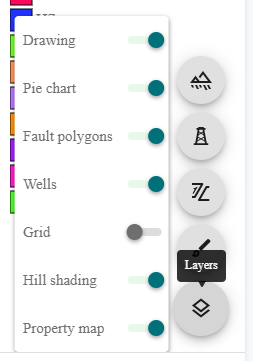
The current design of the toolbar is perhaps suboptimal:
* Layers can be enabled/disabled through the "Layers icon" pop up menu.
* Some layers have their own button on the same level as the layers icon, appearing/disappearing based on if the layer is selected
**What would be nice to achieve:**
* Layer settings and layer on-off closer visually/space wise.
* We can use icons for all layers (not only those where it makes sense with separate button for additional settings). Currently `surface-layer`and `grid-layer` are unused icons available for us through `eds-icons`.
Contributor guide
Assessment
This issue has not been assessed yet.