enthought / enthought/traitsui
Allow padding to be added around Command buttons (e.g. OK, Cancel)
- Dominant language
- Python
- Stars
- 306
- Forks
- 99
- PR merge metrics
- No merged PRs in 30d
Description
This is a feature request taken from [this message](https://groups.google.com/g/ets-users/c/qqcOUmmf1gA) from the user group mailing list. Quoting verbatim:
> This is a minor annoyance, but I think worth fixing or devising a work-around (I'd be interested in any ideas for the latter).
>
> With the Qt5 (PyQt5) toolkit under Linux RHEL 7, command buttons appear butted up against the lower right corner of the window, with no padding. For instance, Example 4 in the TraitsUI manual (https://docs.enthought.com/traitsui/traitsui_user_manual/custom_view.html#command-buttons-the-buttons-attribute) produces (unlike the graphic shown in the manual from a Windows implementation) this:
>
>
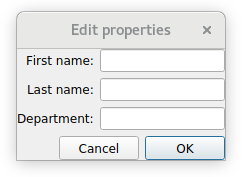
>
> After digging a little online, I found some information that Qt does not include any padding between the edges of a QMainWidget/QMainWindow and its contents, and that to add such padding, one must place all the contents inside another container and set that container's ContentsMargins. I'm guessing that PyFace does not presently do this.
>
> For the other GUI elements that are laid out in the View definition, I can simply add explicit padding as the first and last items of the appropriate HGroup and VGroup, but no such capability exists for the command buttons. It would be nice if TraitsUI created some window-edge padding by default, which could be modified by a "padding" attribute to View().
>
> Jean-Paul Davis
The OK/Cancel buttons are less flexible than other GUI elements.
There may be a solution / design that can close both https://github.com/enthought/traitsui/issues/1148 and this issue.
Contributor guide
No contributing guide indexed for this repository
Assessment
This issue has not been assessed yet.