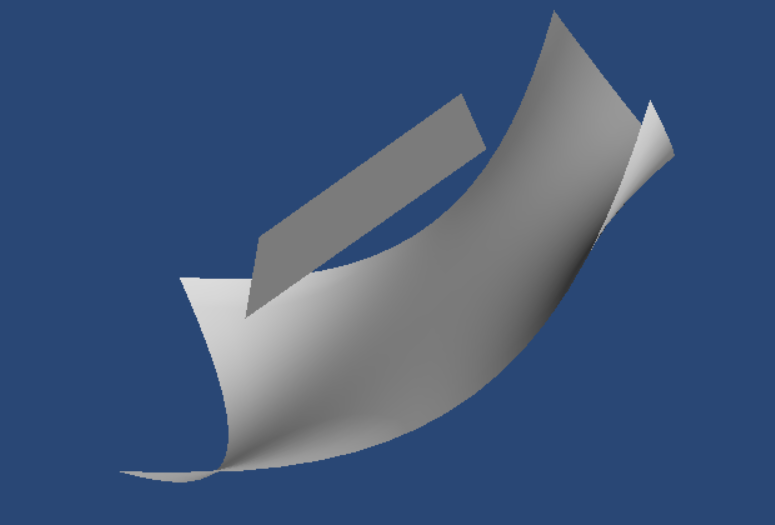
texture doesn't show in jupyter notebook
- Dominant language
- Python
- Stars
- 1.4k
- Forks
- 316
- Avg merge
- 7h 44m
- Merged PRs (30d)
- 5
Description
i use the following code in jupyter notebook:
from tvtk.api import tvtk
from mayavi import mlab
import numpy as np
mlab.init_notebook()
mlab.clf()
fig=mlab.figure(size=(800,640),bgcolor=(0.16,0.28,0.46))
X,Y=np.mgrid[-1:1:20j,-1:1:20j]
Z = -np.cos(Y*X)+.5
img_filename='demo.jpg'
img=tvtk.JPEGReader(file_name=img_filename)
texture=tvtk.Texture(input_connection=img.output_port, interpolate=1)
s = mlab.surf(X,Y,Z,color=(1.,1.,1.))
s.actor.actor.mapper.scalar_visibility=False
s.actor.enable_texture=True
s.actor.tcoord_generator_mode='plane'
s.actor.actor.texture=texture
from mayavi.sources.api import BuiltinSurface
p = mlab.pipeline.surface( BuiltinSurface(source='plane') )
p.actor.actor.mapper.scalar_visibility=False
p.actor.enable_texture=True
p.actor.tcoord_generator_mode='plane'
p.actor.actor.texture=texture
mlab.show()
fig
and i get this:
is this a bug?or i should add something to fix this?
Contributor guide
No contributing guide indexed for this repository
Assessment
This issue has not been assessed yet.