DataLabel (ToolTip) object is not honoring the `auto_adjust` parameter
- Dominant language
- Python
- Stars
- 305
- Forks
- 97
- PR merge metrics
- No merged PRs in 30d
Description
**Problem Description**
My understanding is that the `auto_adjust` parameter to the DataLabel is supposed to allow the label to readjust its positioning if the original position would render any part of the label outside of the visible area (defined by its enclosing container).
**Reproduction Steps:**
See attached example that sets up a simple inspector and will display a label if the mouse position triggers a hit on any of the line plots. If you hover over a line near the upper or right edge of the plot, the label will extend past the visible area eclipsing its content.
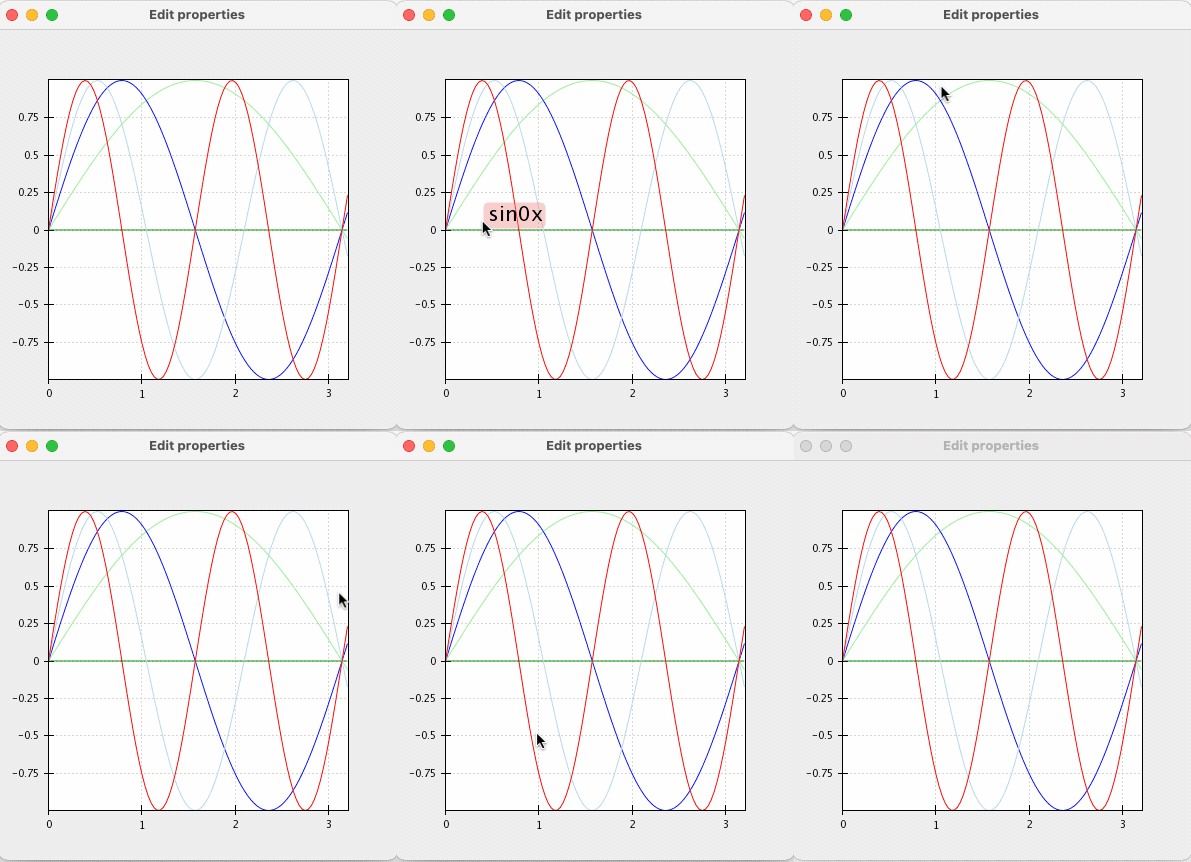
Expand to see code: hover_line_plot.py
```python
from numpy import array, inf, linspace, sin
from chaco.api import ArrayDataSource, ArrayPlotData, DataLabel, Plot
from chaco.tools.api import SimpleInspectorTool
from enable.api import BaseTool, ComponentEditor
from traits.api import HasTraits, Instance, on_trait_change
from traitsui.api import Item, View
class HoverLinePlots(HasTraits):
inspector = Instance(SimpleInspectorTool)
label = Instance(DataLabel)
plot = Instance(Plot)
@on_trait_change('inspector:new_value')
def handle_inspection(self, value):
point = self.inspector.last_mouse_position
if point:
# run through all the plots in the Plot and find closest within threshhold
best = None
best_distance = inf
# inspector is attached to Plot, so we need to adjust screen coords
# to take into account padding
adjusted_point = (
point[0] - self.plot.padding[0],
point[1] - self.plot.padding[1]
)
for name, plots in self.plot.plots.items():
for renderer in plots:
result = renderer.hittest(adjusted_point, return_distance=True)
if result is not None and result[-1] < best_distance:
best = name
best_distance = result[-1]
# adjust label text and position (or hide if nothing)
if best is not None:
self.label.label_text = best
self.label.data_point = array([value['x'], value['y']])
self.label.visible = True
else:
self.label.visible = False
self.label.invalidate_and_redraw()
def __init__(self, **traits):
super(HoverLinePlots, self).__init__(**traits)
self.init()
def init(self):
""" Set up the plot inspector and label. """
x = linspace(0.0, 3.2, 100)
data = ArrayPlotData(
x=ArrayDataSource(x, 'ascending'),
)
for i in range(5):
data.set_data('sin{}x'.format(i), sin(i * x))
self.plot = Plot(data)
for i in range(5):
y_name = 'sin{}x'.format(i)
self.plot.plot(('x', y_name), name=y_name, color='auto')
self.inspector = SimpleInspectorTool(self.plot)
self.plot.tools.append(self.inspector)
self.label = DataLabel(
self.plot,
auto_adjust=True,
visible=False,
label_style='bubble',
corner_radius=5,
marker_visible=False,
show_label_coords=False,
border_width=0,
bgcolor=(0.5, 0.5, 0.5, 0.2),
)
self.plot.overlays.append(self.label)
traits_view = View(
Item('plot', show_label=False, editor=ComponentEditor()),
resizable=True,
)
if __name__ == '__main__':
hpl = HoverLinePlots()
hpl.configure_traits()
```
**Expected behavior:**
I would expect the label to position itself so that the entire label is visible. This repositioning is handled by its base class parameter `ToolTip.auto_adjust` but something appears to be getting mangled in the drawing methods and the label gets clipped anyway. The `auto_adjust` code ([source](https://github.com/enthought/chaco/blob/master/chaco/tooltip.py#L119-L139)) is getting called and it seems to properly adjust the label position when calc'ing layout, however, by the time it reaches the code just above that to `_draw_overlay` ([source](https://github.com/enthought/chaco/blob/master/chaco/tooltip.py#L86-L102)) the position (self.x/y) is the previous unadjusted value.
**OS, Python version:** macOS Big Sur 11.1 (20C69) and Python 3.6.12
Contributor guide
No contributing guide indexed for this repository
Assessment
This issue has not been assessed yet.