Make `Button` and `ImageButton` background color better controlable on disabled ui
- Dominant language
- Rust
- Stars
- 30.6k
- Forks
- 2.1k
- Avg merge
- 1d 9h
- Merged PRs (30d)
- 72
Description
## **Is your feature request related to a problem? Please describe.**
In my UI, I want to embed a button with an image in the same color. Here is a simple example with some extra visible colors:
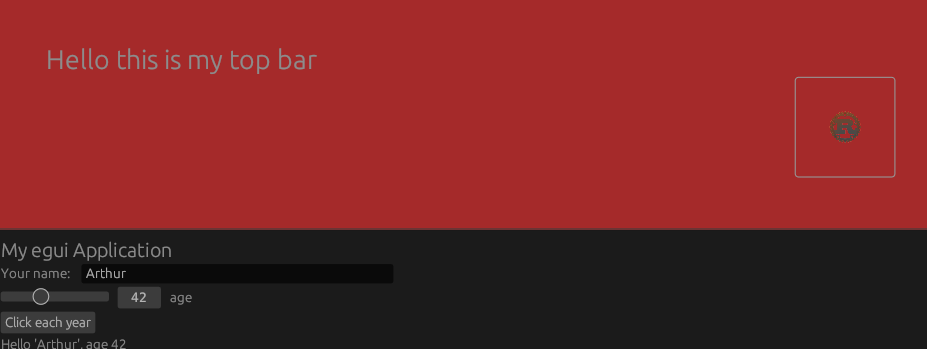
When I do some dragging actions in the central panel of my app, I disable the top bar to prevent unwanted button clicks. When I do so, the buttons frame changes in color. However, I want the button to integrate seemlessly into the top bar at all times.
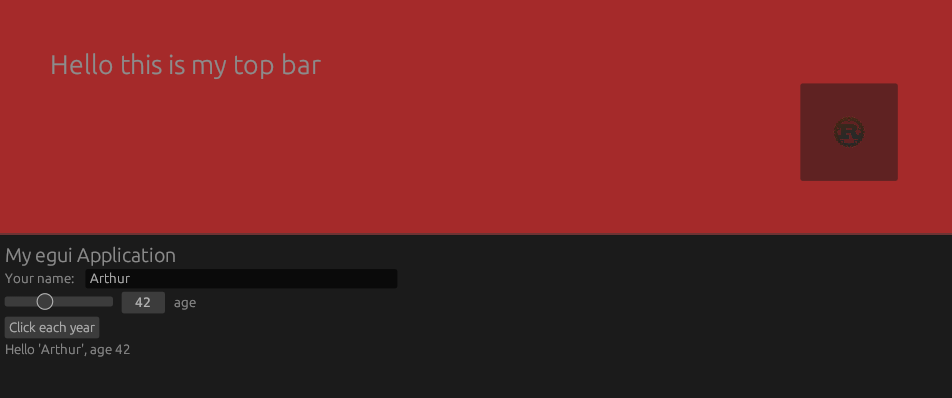
## **Describe the solution you'd like**
I'd like to be able to have an option where I can specify that the button shouldn't be faded out.
## **Describe alternatives you've considered**
Currently the only way to achive something that does this job is to copy the `Button` widget and make some adjustments in it. Even then, the adjustments I have to make are very unergonomic. The fading is set in the `Painter` and is not accessible as a crate user, so the only way to fix it as of now, is to create a completly new `Painter` from the `ui` since the default value of the fade is `None`. This construction involves a `.clone()` of the `Context` which seems undesireable
```
// current
ui.painter().rect(...);
// my fix
let painter = Painter::new(ui.ctx().clone(), ui.layer_id(), ui.clip_rect());
painter.rect(...);
```
I've also tried using `frame(false)` on the button to stop rendering the background rect. But this is also kind of undesireable since then the button looks non-interactive when it's enabled because if you hover it, the line around the button won't be displayed anymore.
Contributor guide
Research direction
Start by tracing the Button and ImageButton entry points and the Painter fade behavior described in the issue. Review how disabled state, frame(false), and Painter construction interact. Done should allow disabled buttons to retain their chosen background appearance while preserving the enabled hover outline, without requiring a custom Painter.
Written by the indexing model from the issue text.
Assessment
- Tech stack
- rust
- Domain
- frontend
- Issue type
- Feature
- Difficulty
- 4/5
- Estimated time
- 3-5 days
- Activity status
- Stale
- Clarity
- Mostly clear
- Newbie friendliness
- 35/100