elementor / elementor/elementor
⌛ 🔗 🔣 Form Submissions does not accept custom date format applied using custom scripts
- Dominant language
- PHP
- Stars
- 7.1k
- Forks
- 1.6k
- Avg merge
- 1d 5h
- Merged PRs (30d)
- 193
Description
## Prerequisites
- [x] I have searched for similar issues in both open and closed tickets and cannot find a duplicate.
- [x] The issue still exists against the latest stable version of Elementor.
## Description
Modifying the date format via JS/jQuery after using the officially recommended code from #4435 is currently incompatible with the [form submissions](https://elementor.com/help/form-submissions/) feature in Elementor Pro.
Date values will be shown as "Invalid date" in the table.
Using this code to change the date format of the flatpickr widget.
```html
jQuery(document).ready(function($) {
setTimeout(function() {
$('.elementor-date-field.flatpickr-input').each(function() {
flatpickr( $(this)[0] ).set('dateFormat', 'd/m/Y');
});
}, 1000 );
});
```
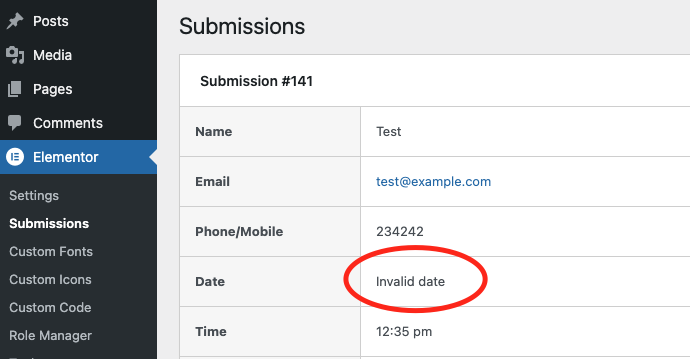
## Isolating the problem
- [x] This bug happens with only Elementor plugin active (and Elementor Pro).
- [x] This bug happens with a default WordPress theme active.
- [x] I can reproduce this bug consistently using the steps above.
## Environment
WordPress 5.7
Only plug-ins active:
Elementor 3.1.4
Elementor Pro 3.2.0
Active theme:
Hello Elementor 2.3.1
Server:
PHP 8.0.3
Apache/2.4.46
MariaDB 10.5.8
@shilo-ey
Contributor guide
Assessment
This issue has not been assessed yet.