elementor / elementor/elementor
Posts widget with manual excerpt - paragraph tags have no bottom margin
- Dominant language
- PHP
- Stars
- 7.1k
- Forks
- 1.6k
- Avg merge
- 1d 5h
- Merged PRs (30d)
- 193
Description
## Prerequisites
- [x] I have searched for similar issues in both open and closed tickets and cannot find a duplicate.
- [x] The issue still exists against the latest stable version of Elementor.
## Isolating the problem
- [x] This bug happens with only Elementor plugin active (and Elementor Pro).
- [x] This bug happens with a default WordPress theme active.
- [x] I can reproduce this bug consistently using the steps above.
When a manual excerpt for a post is created with 2 line breaks, two `
` tags will be generated on the front-end for the Posts Elementor widget, however Elementor doesn't have any margin defined for `
` tags inside excerpts - so the front-end excerpt doesn't look like the back-end manual excerpt textarea.
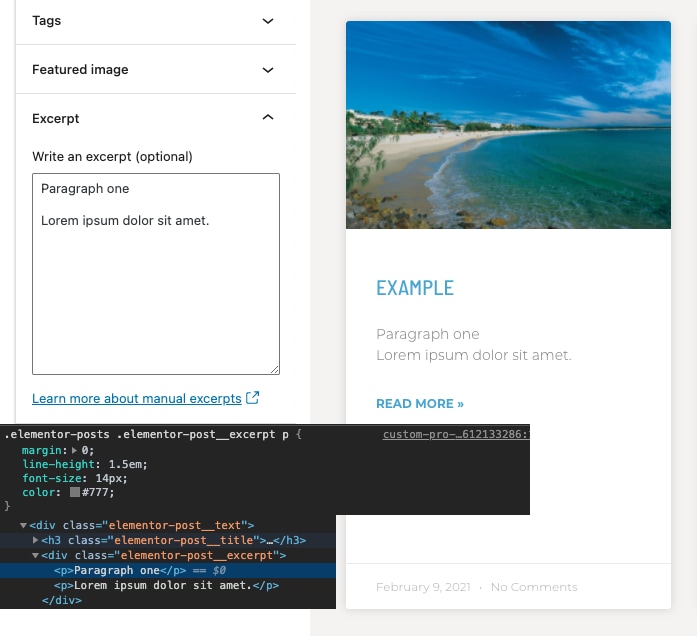
Elementor's default CSS sets a `margin: 0` to paragraph tags inside excerpt - this shouldn't be like that.
When there's a single line break in the manual excerpt textarea, there will be no `
` generated, instead a single `
` will be used on the front-end - which looks correctly - the text will be on a new line with no vertical space between.
A workaround is to add this custom CSS to the Posts widget, which fixes the issue:
```
selector .elementor-post__excerpt p:not(:last-child) {
margin-bottom: 1em;
}
```
Please add this fix inside Elementor core so that paragraphs inside excerpts have a margin.
Contributor guide
Assessment
This issue has not been assessed yet.