Drives cannot be renamed in the sidebar
- Dominant language
- Vala
- Stars
- 365
- Forks
- 82
- Avg merge
- 4d 2h
- Merged PRs (30d)
- 3
Description
I have 4 drives in my current system. Elementary defaults to files being placed on the 1st drive in the system and sets up default folders for users. I however, want to store my files on a large (1 TByte) spinning drive and temporary files on an SSD for rapid read and write. My system drive is an NVME.
Now my issue. I've tried various times to RENAME the drives, but they still show up as a long alpha-numeric name that makes sense to Elementary, but I'm not sure how to get the name to show up correctly in the File Manager.
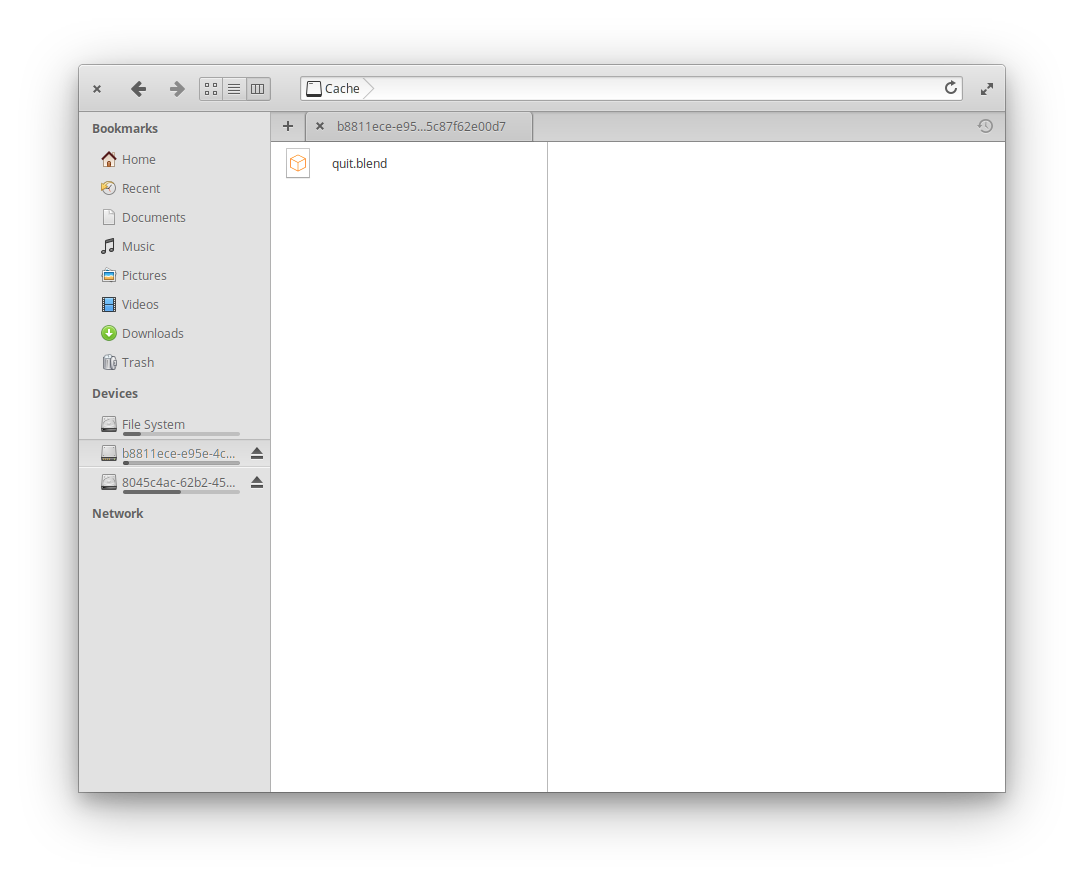
It was brought to my attention that not only is the Left Side Bar displaying the Mount Point for the drive (a long alpha-numeric sequence) but so is the currently open Tab in the File Manager. The Path to the currently selected file is Displaying the Device Name correctly.
So there is a bug in how Device Names (Disc Drives) are being displayed. Also - it would be lovely to be able to RENAME the drive from within the File Manager. Currently I'm using the GParted Partition Editor from the App Center to rename my Drives.
Thanks. This is a cross posting from:
https://elementaryos.stackexchange.com/questions/26486/drive-names-in-the-files-manager
Contributor guide
Assessment
This issue has not been assessed yet.