When connecting iPhone, only its "Documents" directory is mounted
- Dominant language
- Vala
- Stars
- 365
- Forks
- 82
- Avg merge
- 4d 2h
- Merged PRs (30d)
- 3
Description
# Description
When I conntect an iPhone I see this in the sidebar of Files:
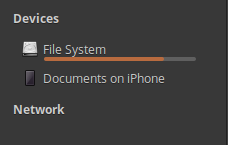
When I click on "Documents on iPhone" I see this (after waiting for Files to unfreeze, as mentioned in #1541):

The contents above is just the "Documents". I can't easily navigate to the DCIM directory to see pictures, access Downloads, etc. In order to access the "root" directory of iPhone I have to manually edit the path at the top:

I had to remove `:3` from the end of the path. This way I finally get access to the "root" directory:

# Why it's wrong
I believe that access to the "root" directory should be mounted by default, instead of the "Document" directory. It is not easy to figure out how the path should be modified to get to what you need.
# Version
eOS 5.1.7
Contributor guide
Assessment
This issue has not been assessed yet.