Automatically retry connection to Samba network drive, after connection problem
- Dominant language
- Vala
- Stars
- 365
- Forks
- 82
- Avg merge
- 4d 2h
- Merged PRs (30d)
- 3
Description
## Prerequisites
- [X] I have searched open and closed issues for duplicates.
## Feature
Today I configured a shared USB drive, connected to the home router (Samba network).
I connected to the router successfully, by inserting the credentials, and selected to remember credentials forever, as this is a private network.
Suddenly while repositioning the drive, the USB cable disconnected. After reseating it, the connection was broken: it wasn't possible to reopen the shared drive in files, and apparently there's no option to reset this network connection.
Thinking about a problem with the router (I didn't eject the drive from the control panel), I've opened the router console, but the drive was there, recognized correctly.
Casually I've found out that to fix the problem and access the drive again without rebooting, you can follow these steps:
_1. Eject the drive from "network bookmarks" in the sidebar,_
2. Navigate again to the samba network address (like ```smb://192.168.1.1/```)
3. Now you will see that access is restored
Without doing point n°**1**, you cannot reconnect, doesn't matter if you try from the address bar, bookmark, or any other kind of shortcut.
**Pressing the eject button seems to reset something that is not accessible elsewhere.**
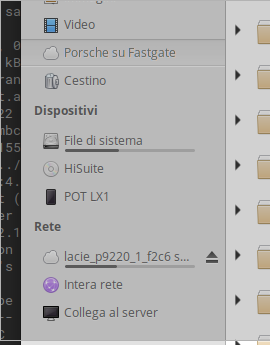
As you can see the shared network drive has an eject button ("Rete" is the italian for "Network")
**Describe the solution you'd like**
I think that a simple solution would be to automatically eject the drive after the error showing up:
- If the drive is still unconnected, there's no need to have it in the shortcuts, it can show off
- If the drive has been reconnected, it will be available again
**Existing work**
I've tested in gnome "files" and it behaves the same as elementary os file app
Yes that's not a mandatory feature, but it's nice to give some kind of tip to the user, on how to proceed.
Being not an expert of Samba + Linux I've started googling and ended installing smbclient and other stuff, thinking of a configuration problem. Instead it was simple as pressing a button!
Bye :-)
Contributor guide
Assessment
This issue has not been assessed yet.