Ability to create new files/folders inside child folders in list view
- Dominant language
- Vala
- Stars
- 365
- Forks
- 82
- Avg merge
- 4d 2h
- Merged PRs (30d)
- 3
Description
## Prerequisites
- [x] I have searched open and closed issues for duplicates.
## Feature
### Is your feature request related to a problem? Please describe.
You can't create new files or folders within a child folder of any depth in List view.
Consider this directory tree in this base path (ignore folder names, they were for other issues):
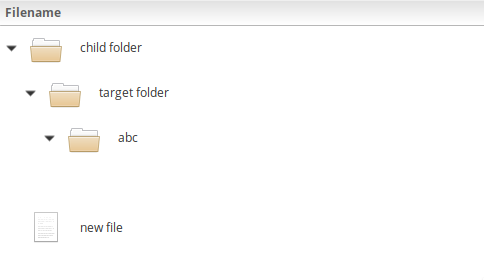
I can't create new folders in any of these child folders without navigating to the folder (either in-tab or with a new tab) and creating the folder. Doing this would also lose the current state of the list for when I go back (e.g. any child folders I expanded).
Even if I select and right click the selectable blank row in an empty child folder (also, you can't select the blank row if you right click in its name column):
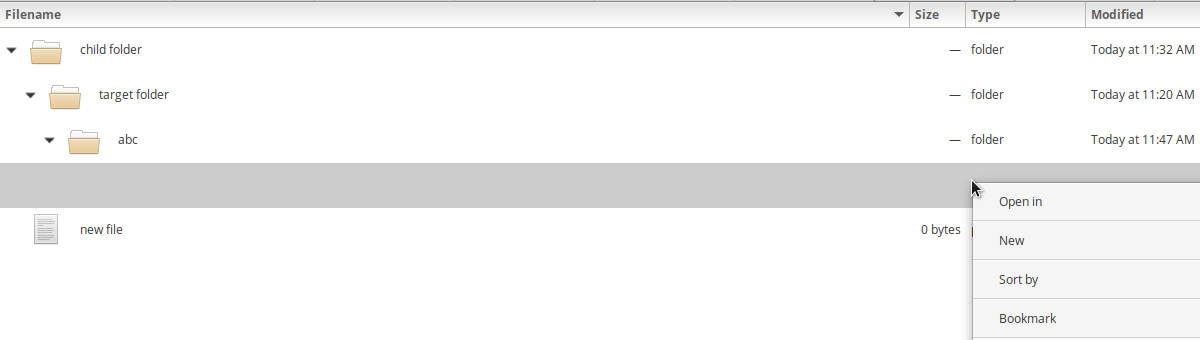
And then use the New submenu, it creates the new file or folder in the base folder, not that child folder.
### Describe the solution you'd like
If you right-click in the following areas:
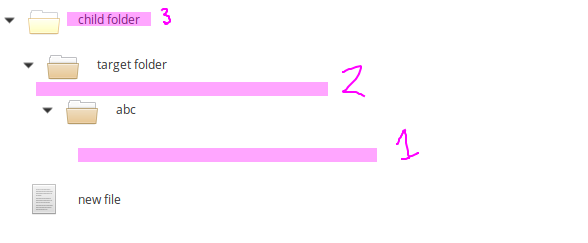
1. The selectable blank row of an empty expanded folder (probably easy, since it's technically an item in the list)
2. The blank area right under a folder (it might literally just be a question of doing point 3, since this selects the folder if you right click in the non-name columns)
3. The child folder itself (trivial)
Show the New submenu for those cases. It should create any new file or folder in the child folder selected. Expand the folder if it's not already expanded and then do the usual new file behaviour (scroll the view to the new file/folder, start renaming, etc.).
For no. 1, you might even be able to make the blank row just show the context menu for its parent item which would probably be fairly easy to implement. It would probably be fine UX-wise if you then automatically showed the blank row and its parent as selected when right clicking the blank row. So like this:
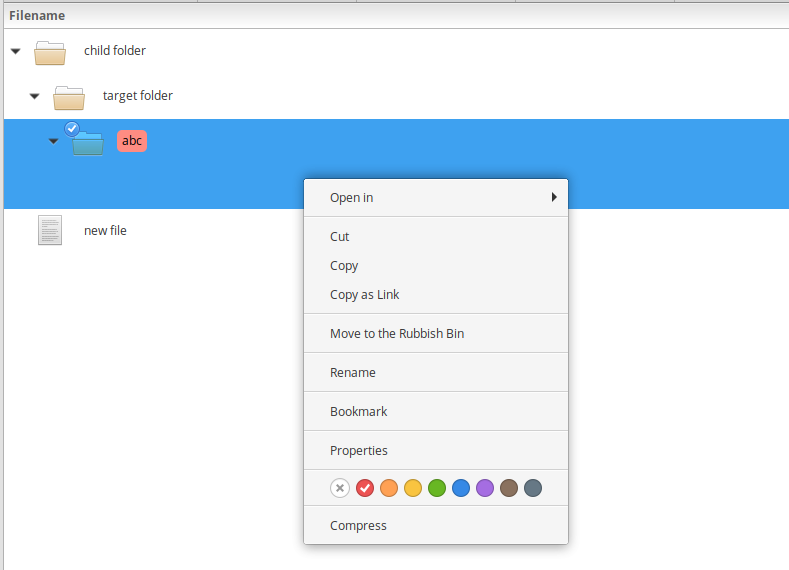
(note: this is a GIMP mockup edited from several screenshots, it's not possible to get current Files to look like this; also this mockup does not show the New submenu that is being proposed)
#### Multiple selection
In the case of having multiple folders selected, probably just resort to creating the new file/folder in the base folder, or just don't show the New submenu (probably the best option, as it's less confusing).
I'm not sure if there's a use-case for creating multiple new files or folders in several child folders simultaneously. Sequentially renaming each newly created file individually could be a possibility, but that would be for another issue probably (as presumably sequential bulk renaming could be done on any selection of files or folders).
### Existing work
N/A
### Describe alternatives you've considered
I guess you could make a new file/folder in the base folder and then move it into the desired folder in the tree, but this is more of a workaround than an alternative.
### Additional context
These additional New submenus should probably only be available in List view as they mostly only make sense there. You wouldn't be able to see your new file/folder in Grid mode without going into it anyway (required for renaming) and it's already trivial to make new files/folders in child folders in Columns view.
Contributor guide
Assessment
This issue has not been assessed yet.