element-hq / element-hq/element-web
Custom theme colors don't override colors on auth pages
- Dominant language
- TypeScript
- Stars
- 13.5k
- Forks
- 2.8k
- PR merge metrics
- PR metrics pending
Description
### Steps to reproduce
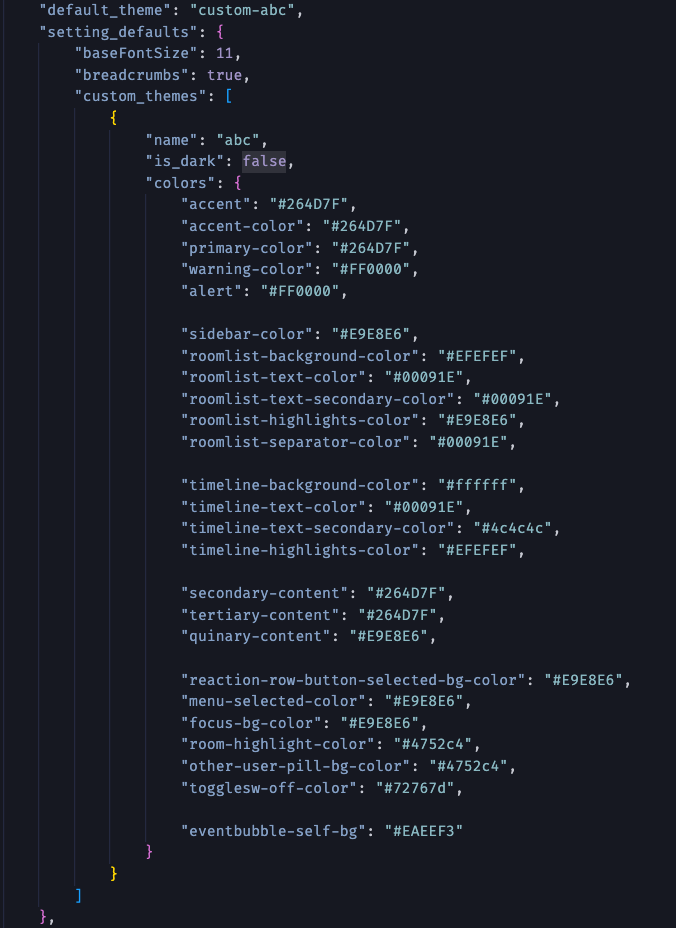
I have defined a custom theme inside the config.json. This works as expected inside the messenger, but not on auth pages like login for example.
Config:
Login page:
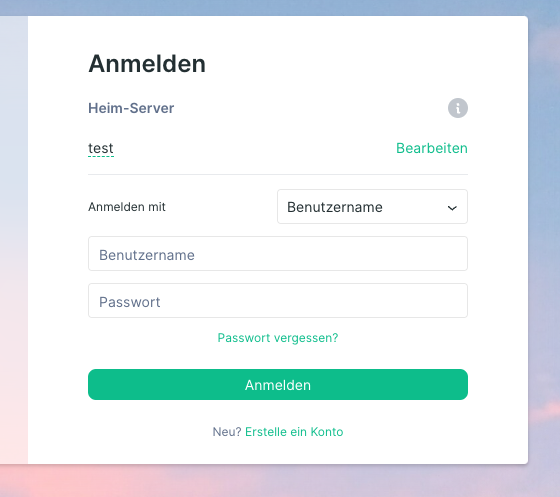
As far as I understood the buttons use the $accent variable, which is correctly defined in the theme.
Am I missing something here?
### Outcome
#### What did you expect?
Buttons and links on the login page should have the defined theme color, in this case #264D7F.
#### What happened instead?
Buttons and links on the login page have the default green #0DBD8B Element color.
### Operating system
macOS
### Browser information
Google Chrome 107.0.5304.121
### URL for webapp
_No response_
### Application version
_No response_
### Homeserver
_No response_
### Will you send logs?
No
Contributor guide
Assessment
This issue has not been assessed yet.