element-hq / element-hq/element-web
html tooltips & pre-populated values in prompt for creating new rooms in space are confusing
- Dominant language
- TypeScript
- Stars
- 13.5k
- Forks
- 2.8k
- PR merge metrics
- PR metrics pending
Description
### Steps to reproduce
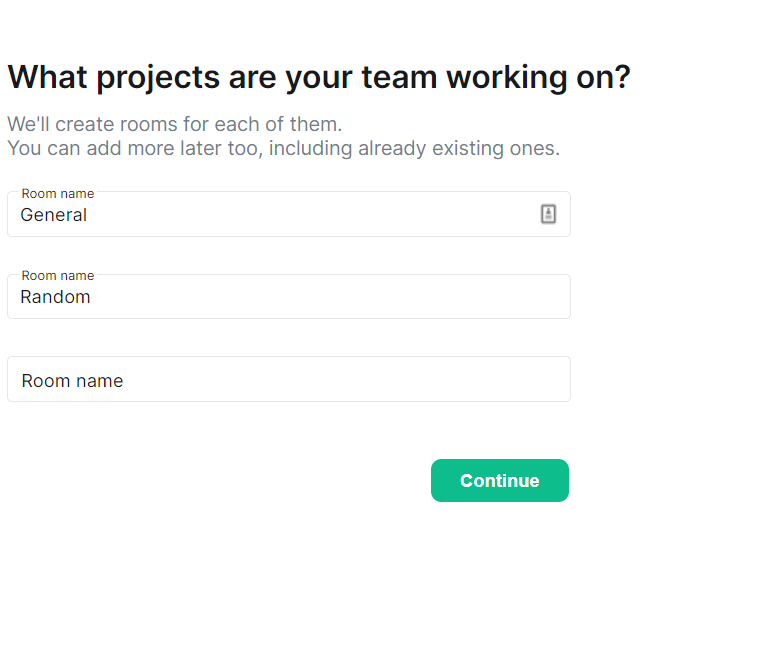
After creating a public/team space, you are prompted to create new rooms. Two of the three fields have pre-populated values
- General
- Random
The third field isn't populated with anything
The html placeholder for the three fields are
- General
- Random
- Support
This is confusing - generally placeholder values help the user understand what to input into a field, rather than show examples of rooms. Does the first room need to be general? Do I need to generate a random name for the second? Must the third room be a support room?
It's also not obvious that the user needs to remove the text from 'Random' if they only want to create one room.
It would be clearer to show a placeholder saying 'Room Name' and not pre-populate the room names.
### Outcome
#### What did you expect?
Create one room
#### What happened instead?
I got a random room named 'Random'
### Operating system
_No response_
### Browser information
_No response_
### URL for webapp
_No response_
### Application version
_No response_
### Homeserver
_No response_
### Will you send logs?
No
Contributor guide
Research direction
Start by reproducing the new-room prompt after creating a public or team space, checking the three fields and their current placeholders. Done means the fields are empty, use “Room Name” as the placeholder, and creating one room does not create an unintended room named “Random”.
Written by the indexing model from the issue text.
Assessment
- Tech stack
- typescript
- Domain
- frontend
- Issue type
- Bug
- Difficulty
- 3/5
- Estimated time
- 1-2 days
- Activity status
- Stale
- Clarity
- Mostly clear
- Newbie friendliness
- 35/100