element-hq / element-hq/element-web
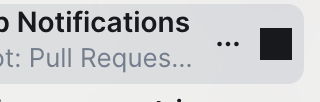
Rooms with custom notification rules get black square for notification icon
- Dominant language
- TypeScript
- Stars
- 13.5k
- Forks
- 2.8k
- PR merge metrics
- PR metrics pending
Description
### Steps to reproduce
1. Set custom notification options for a room that don't match any of the 4 options in the menu (eg. `curl -X PUT --data-binary '{"actions": ["notify"]}' -H 'Authorization: Bearer [token goes here]' 'https://matrix.org/_matrix/client/v3/pushrules/global/room/[room ID]'`)
2. Hover over the room tile in the left panel in Element
### Outcome
#### What did you expect?
Not sure - the icon appears on hover to represent the current notification state, but since it's none of the 4 options in the menu, there's no obvious icon to display.
#### What happened instead?
Notifications icon is a black square because the black background gets set but none of the icon css classes get applied so no mask image.
### Operating system
macOS
### Application version
Nightly
### How did you install the app?
_No response_
### Homeserver
_No response_
### Will you send logs?
No
Contributor guide
Assessment
This issue has not been assessed yet.