element-hq / element-hq/element-web
Allow stacking the timeline and the thread view horizontally
- Dominant language
- TypeScript
- Stars
- 13.5k
- Forks
- 2.8k
- PR merge metrics
- PR metrics pending
Description
### Your use case
#### What would you like to do?
I'd like to make use of the threading feature - having a thread open and visible while the timeline can similarly be navigated. Currently when I have Element open on the left-half of one of my monitors, it is just about usable. But when the threading pane is opened, the timeline becomes unusable. This is a standard 23", 16:9 1080p monitor.
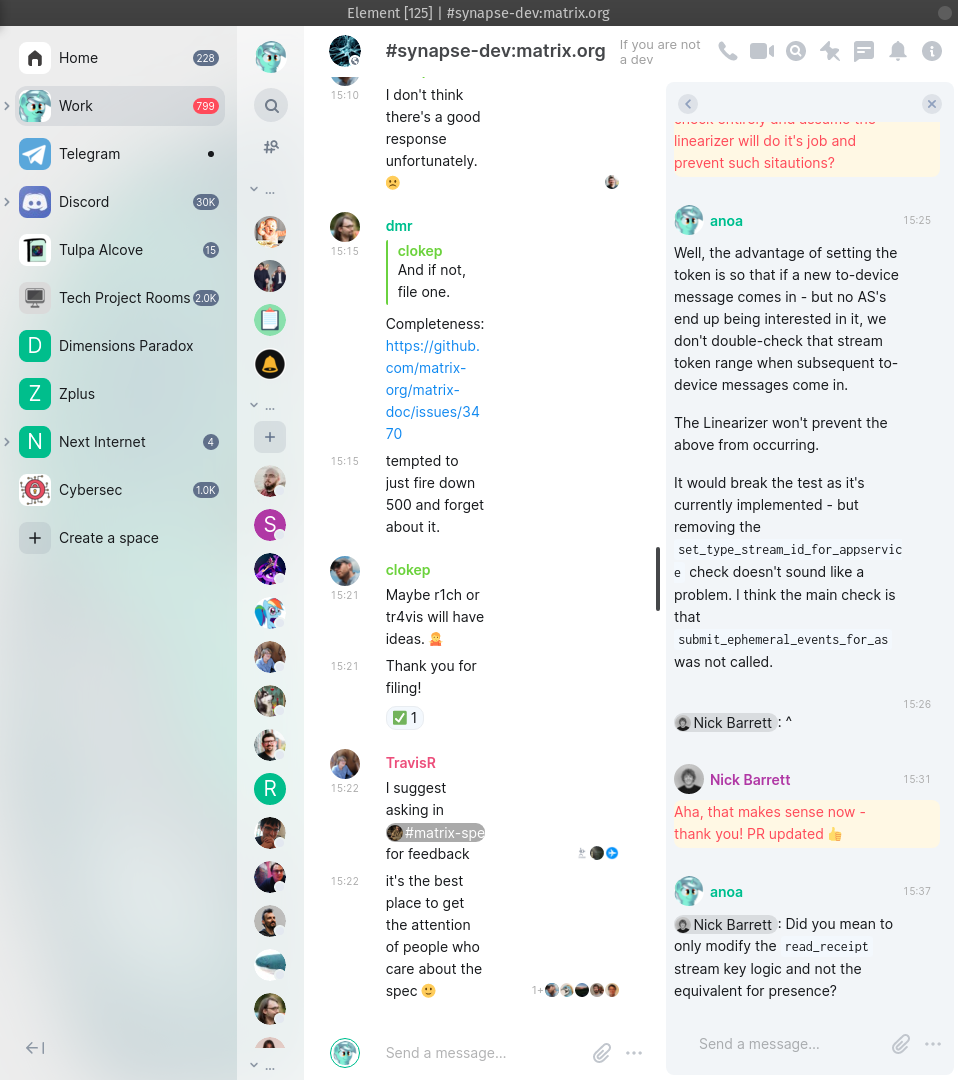
#### Why would you like to do it?
I think threading is awesome! And I also only have so much screen real estate, so having Element on half a monitor is what I do. Having both work together would be great!
#### How would you like to achieve it?
Add an intuitive way to allow the user to stack the thread view (or perhaps simply the right-sidebar altogether) on top/below the timeline. That way both the timeline and the thread view can make use of the available vertical space, without contending for the limited horizontal space.
### Have you considered any alternatives?
I could instead lay Element out on the *top half* of my monitor, and have other applications below. However, Element is just a series of vertically scrolling lists, so dedicated more vertical space to the app than horizontal space is desired.
Also most window managers don't easily let you pin something to the top-half of your screen out of the box - but they will support pinning an app to the left or right halves of the screen.
Alternatively, for my specific instance, preventing read receipts from taking up half the timeline's horizontal space would help as well.
### Additional context
_No response_
Contributor guide
Assessment
This issue has not been assessed yet.