element-hq / element-hq/element-web
Improve visibility of encrypted chat rooms
- Dominant language
- TypeScript
- Stars
- 13.5k
- Forks
- 2.8k
- PR merge metrics
- PR metrics pending
Description
### Description
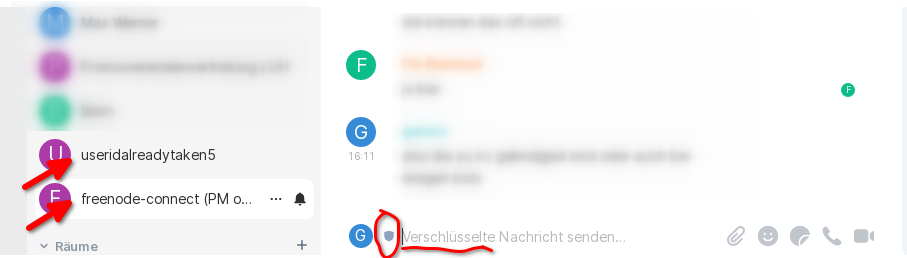
Currently, the encryption status of a room is only visible at the line, where one enters the message. Additionally, it can be seen in the room details but this requires an extra click.
I have heard it from several people and experienced for myself that one "forgot" to encrypt an yet unencrypted room simply because it is not that visible. Since encrypted rooms should be always the default (I guess), it may be meaningful to make the difference more visible.
### Steps to reproduce
- Create an unencrypted room.
- Create an encrypted room
- See the visual differences.
Ideas (this is oriented on browsers):
- Mark unencrypted rooms, not encrypted ones. Encrypted is normal, unencryted needs a notification.
- Mark rooms additionally in the room list on the left side (see arrows).
- (Maybe) Use a lock instead of a shield symbol (like browsers do, people then recognize the symbol).
### Version information
- **Platform**: desktop
For the desktop app:
- **OS**: Linux
- **Version**: 1.7.29
Contributor guide
Assessment
This issue has not been assessed yet.