element-hq / element-hq/element-web
Element will try using default homeserver's identity server if .well-known lookup is invalid
- Dominant language
- TypeScript
- Stars
- 13.5k
- Forks
- 2.8k
- PR merge metrics
- PR metrics pending
Description
### Description
This is probably related to vector-im/element-meta#1622.
When you press the "Sign In" button on Element, if a default homeserver is configured it will try to query its .well-known endpoint.
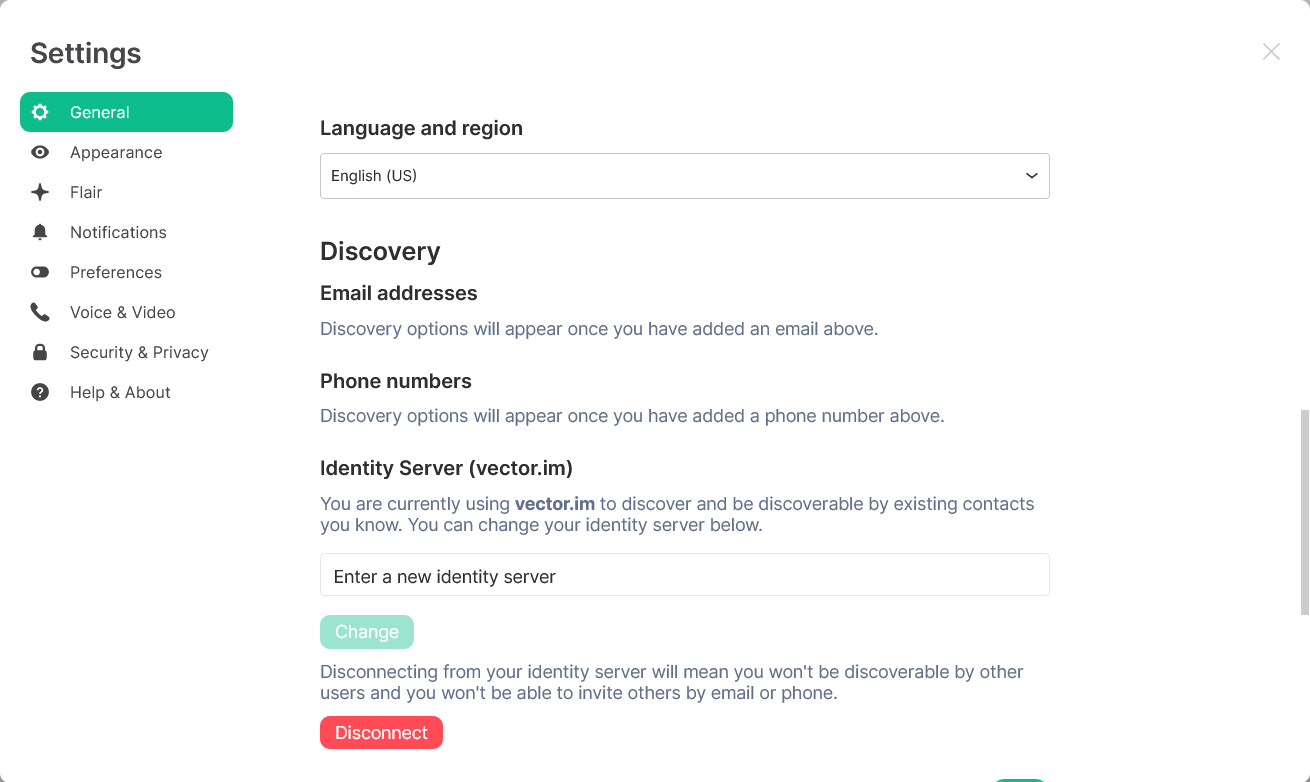
If you then edit the homeserver to a different homeserver other than the default, and this new homeserver's .well-known endpoint does not set the base_url of m.identity_server (or sets it to an invalid URL such as ""), Element will continue to try using the identity server of Element's default homeserver. This can lead to some confusing and unexpected results in the Settings menu.
### Steps to reproduce
**Prerequisite:** Have a working homeserver that sets a .well-known m.homeserver base_url, but does not set the m.identity_server base_url or sets the base_url to "" (null).
1. Navigate to https://app.element.io/ and press the "Sign In" button.
2. Edit the homeserver from matrix.org to your own homeserver and register a new account. Login to your new account.
3. Open the Settings dialog. Element will indicate that you are using the vector.im identity server (even though you're not; you haven't even agreed to the terms of the identity server).
In the example above you get vector.im on app.element.io because the default homeserver is matrix.org, and the .well-known endpoint sets m.identity_server to vector.im. If you use a different Element Web with a non-matrix.org default, and this homeserver sets a m.identity_server in its .well-known, then the identity server that is displayed in step 3 will be different.
**Describe how what happens differs from what you expected.**
Logs being sent: no
While this is technically spec compliant, since the .well-known endpoint requires you to include a base_url for **both** m.homeserver and m.identity_server, displaying the Settings menu in this way can lead to some confusing and unexpected behaviour (see the referenced issue vector-im/element-meta#1622).
### Version information
- **Platform**: Both Element Web and Element Desktop
For the web app:
- **Browser**: Firefox 87.0
- **OS**: Windows
- **URL**: app.element.io
For the desktop app:
- **OS**: Windows
- **Version**: 1.7.25
Contributor guide
Research direction
Start with the sign-in flow and its .well-known handling, then reproduce the listed steps using a default homeserver and a different homeserver without a valid m.identity_server base_url. Done means the Settings dialog no longer displays or uses the default homeserver's identity server for the newly selected homeserver.
Written by the indexing model from the issue text.
Assessment
- Tech stack
- typescript
- Domain
- authentication, frontend
- Issue type
- Bug
- Difficulty
- 3/5
- Estimated time
- 1-2 days
- Activity status
- Stale
- Clarity
- Mostly clear
- Newbie friendliness
- 35/100