element-hq / element-hq/element-web
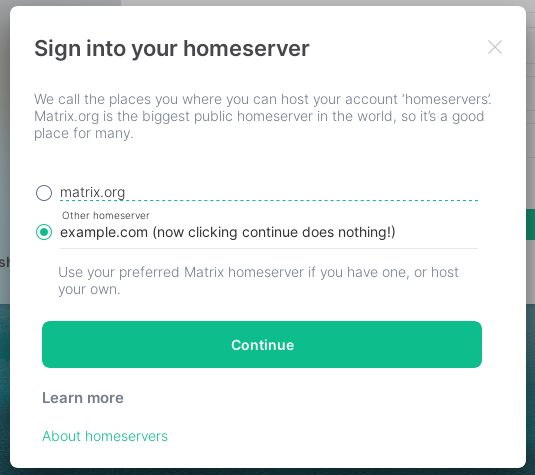
"Sign into your homeserver" UI is confusing
- Dominant language
- TypeScript
- Stars
- 13.5k
- Forks
- 2.8k
- PR merge metrics
- PR metrics pending
Description
### Description
The new UI introduced by matrix-org/matrix-react-sdk#5426 for signing in with a custom homeserver is confusing. Previously you would be shown an input box saying "Homeserver URL", the meaning of which was clear. However, now we get a radio button list of options, where the first is "matrix.org" and the second is an input box labeled "Other homeserver". (Is a radio list really necessary for only 2 options?) Because of the other option being "matrix.org", I though that I should simply enter my server's name (example.com) instead of its URL (https://matrix.example.com). However, entering this prevents me from pressing the "Continue" button, and I am not shown any error or form validation message that would tell me what is wrong, causing me to think that the sign in flow is simply broken. :( Only after opening the console and seeing the error message do I realize that I am meant to input the homeserver URL in the box. The previous text "Sign in to your Matrix account on matrix.org [Change]" was also much easier to understand, and did not require new users to learn what "Homeserver" means to know what they're doing.
### Version information
- **URL**: https://develop.element.io/
Contributor guide
Research direction
Start by reviewing the custom homeserver sign-in flow introduced by matrix-org/matrix-react-sdk#5426 and reproduce it at https://develop.element.io/. Check the behavior when entering a homeserver name instead of a URL; done means the form clearly explains the expected input and no longer leaves the Continue action silently unavailable.
Written by the indexing model from the issue text.
Assessment
- Tech stack
- typescript
- Domain
- frontend
- Issue type
- Bug
- Difficulty
- 3/5
- Estimated time
- 1-2 days
- Activity status
- Stale
- Clarity
- Mostly clear
- Newbie friendliness
- 35/100