element-hq / element-hq/element-web
Session list for current user does not indicate current session
- Dominant language
- TypeScript
- Stars
- 13.5k
- Forks
- 2.8k
- PR merge metrics
- PR metrics pending
Description
### Description
When I view the details of my own user (in the sidebar), e.g. by clicking on my own username in a room userlist, or at https://riot.im/app/#/user/@matthijs:matrix.org (which is also where the "Verify where you're logged in" popup/toast sends you), I see a list of sessions, but without any indication about which is the *current* session:

(Here, I already clicked "2 verified sessions" to show the complete session list).
Note that in the account settings, the current session is already (somewhat vaguely) indicated by making it bold:
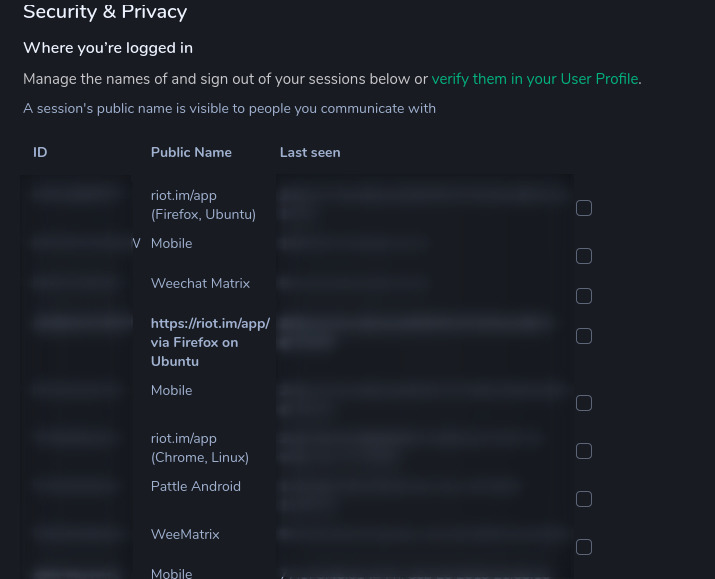
### Version information
- **Platform**: Web
- **Browser**: Firefox 78
- **OS**: Ubuntu 19.10.
- **URL**: riot.im/app
Contributor guide
Research direction
Open the own-user details view at https://riot.im/app/#/user/@matthijs:matrix.org and compare its session list with the account settings session list, where the current session is bold. Trace the session-list entry point from that view; done means the current session is clearly identified in the complete session list as well.
Written by the indexing model from the issue text.
Assessment
- Tech stack
- typescript
- Domain
- frontend
- Issue type
- Bug
- Difficulty
- 3/5
- Estimated time
- 1-2 days
- Activity status
- Stale
- Clarity
- Mostly clear
- Newbie friendliness
- 35/100