element-hq / element-hq/element-web
Review session ("Review where you're logged in") provides no help about what to do
- Dominant language
- TypeScript
- Stars
- 13.5k
- Forks
- 2.8k
- PR merge metrics
- PR metrics pending
Description
### Description
When opening the webapp, I get a popup asking me to "Review where you're logged in":
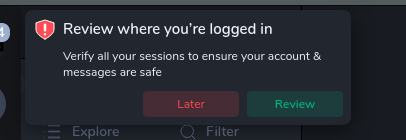
I believe this happens whenever you open the app and have any unverified sessions.
When I click "Review", I end up in the home screen, with a device list opened in the sidebar:
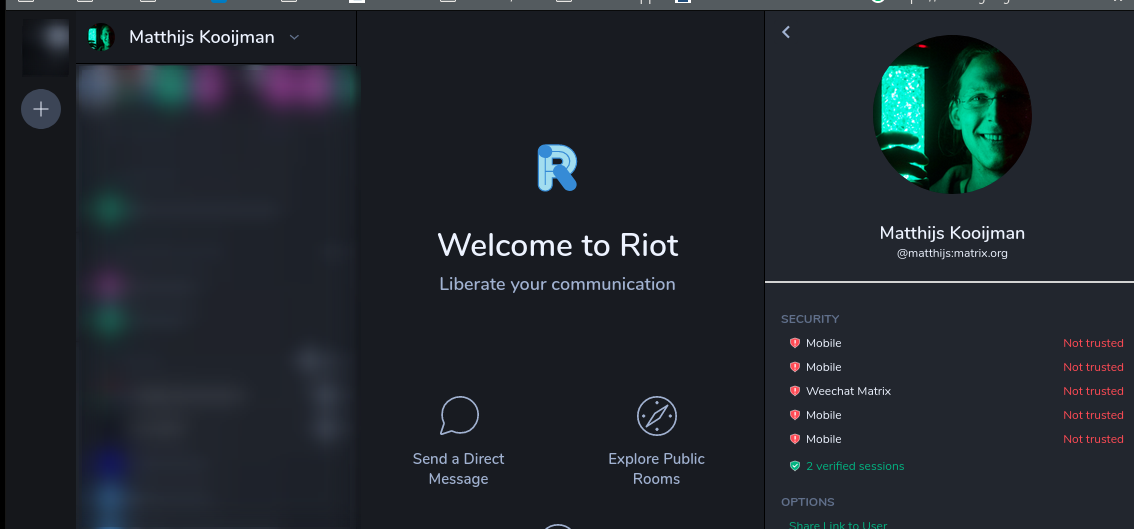
Since the device list is in the sidebar, it is not immediately clear that action is required there. Also, there is no guidance about what to actually needs to be done, why it should be done and how it should be done.
Possible improvements would be to:
- Move the interface into the center, so the focus is more clear
- Add more information on what needs to happen
- Maybe make the interface a bit more clear (maybe add verify/remove/information buttons directly in the device list, rather than having to click a device first). See also #13187, which suggests allowing deleting devices from this list.
### Version information
- **Platform**: Web
- **Browser**: Firefox 78
- **OS**: Ubuntu 19.10.
- **URL**: riot.im/app
Contributor guide
Assessment
This issue has not been assessed yet.