element-hq / element-hq/element-ios
Improve layout of app in landscape orientation
- Dominant language
- Swift
- Stars
- 1.8k
- Forks
- 544
- PR merge metrics
- PR metrics pending
Description
### Steps to reproduce
1. Open a room or DM
2. Using an iPhone 11, turn it into landscape orientation
### Outcome
#### What did you expect?
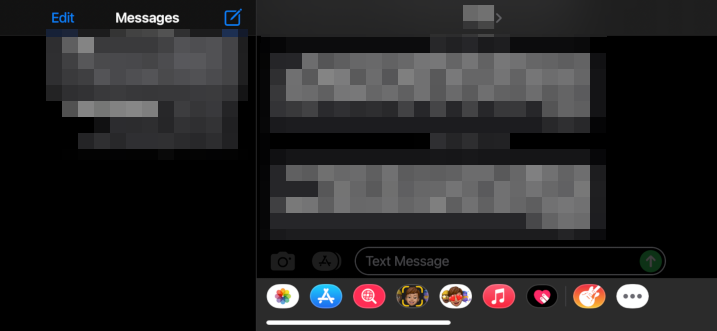
Good spacing and layout, e.g. like in the Messages app:
#### What happened instead?
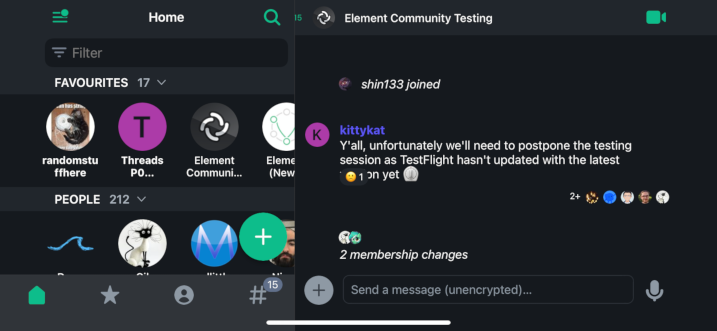
Improvements could include the following:
- the `<15` in the room header should be visible
- reactions shouldn't be on top of the message
- the icons at the bottom are misaligned between home and the composer
- the homescreen tabs are not respecting the padding right and left of the screen… but also, while that space looks like it complies with the expected behaviour on iOS, as a user, it would be handy for me to see more of the left panel
### Your phone model
iPhone 11
### Operating system version
iOS 15.3.1
### Application version
Gil's Spaces Alpha build
### Homeserver
_No response_
### Will you send logs?
No
Contributor guide
Research direction
Reproduce the layout on an iPhone 11 running iOS 15.3.1 by opening a room or DM and rotating to landscape. Inspect the room header, message reactions, bottom icons, and homescreen tabs; done means the header text is visible, reactions do not overlap messages, icons align, and tab padding and panel visibility match the expected layout.
Written by the indexing model from the issue text.
Assessment
- Tech stack
- ios, swift
- Domain
- mobile
- Issue type
- Bug
- Difficulty
- 4/5
- Estimated time
- 3-5 days
- Activity status
- Stale
- Clarity
- Mostly clear
- Newbie friendliness
- 42/100