element-hq / element-hq/element-ios
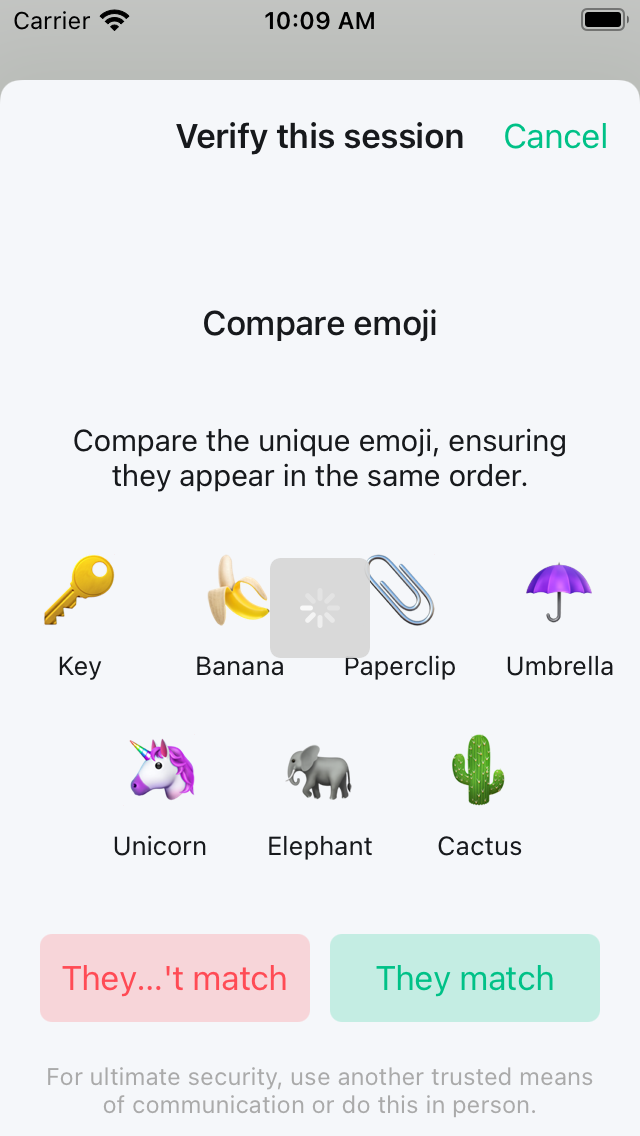
Button text clipped in Emoji Verification on 4" devices
Open
T-Defect
- Dominant language
- Swift
- Stars
- 1.8k
- Forks
- 544
- PR merge metrics
- PR metrics pending
Description
### Steps to reproduce
1. Sign in to a fresh session on an iPhone 5/SE (1st gen), iPhone 6/7/8 in zoomed mode, or iPod Touch.
2. Perform verification with another device and choose emoji instead of QR code.
### What happened?
The "They don't match" button says "They...'t match"
### Operating system version
14.7.1
### Application version
1.5.4
Contributor guide
Research direction
Start by reproducing Emoji Verification on the listed small iPhone and iPod Touch configurations, then inspect the screen containing the “They don't match” button and its layout constraints. Done means the complete button text is visible without clipping on the affected 4-inch and zoomed devices.
Written by the indexing model from the issue text.
Assessment
- Tech stack
- swift
- Domain
- mobile
- Issue type
- Bug
- Difficulty
- 3/5
- Estimated time
- 1-2 days
- Activity status
- Stale
- Clarity
- Mostly clear
- Newbie friendliness
- 45/100