element-hq / element-hq/element-ios
No "Devices" tab or "Show Device List" option on someone's profile
- Dominant language
- Swift
- Stars
- 1.8k
- Forks
- 544
- PR merge metrics
- PR metrics pending
Description
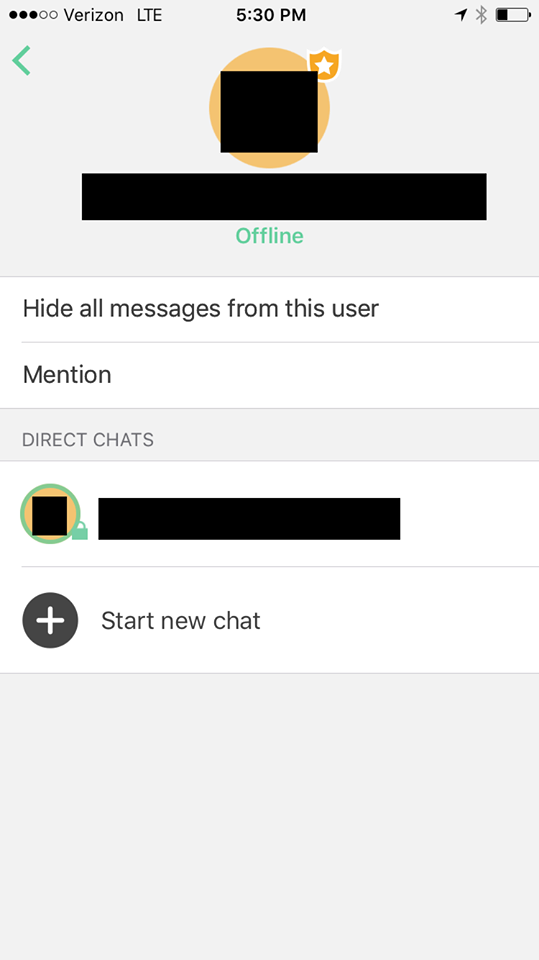
I was trying to help two friends install Riot today, both iPhone users. Whenever either of them would try to bring up a user's "profile page" (I don't know what the technical term for this is, but see the attached image) by going into Room Details and clicking their username under Members (it's "People" on the Android version), there's no option for "Devices" or "Show Device List," and thus no way to Verify someone.
Two things:
1. For one of my friends, the option just did mysteriously appear one time when he pulled up my "Profile," but we didn't do anything different at all to make that happen. It didn't seem to be after a restart or anything special like that. It just happened to work.
2. That same user who had the Show Device List option mysteriously appear, he was trying to Verify the *other* iPhone user, and got it to give him an opportunity to Verify that friend because he had the "Encrypt to verified devices only" option turned on, and then tried to send a message to that friend--this brought up the option to Verify. But, when the other friend tried the same, turning that same option on and trying to reply, it neither brought up the option to Verify NOR successfully sent a message.
Please see the attached image for a picture of the "profile" page mysteriously lacking the Devices list.
Contributor guide
Research direction
Start by reproducing the Room Details > Members/People > user profile flow on iPhone, including the missing Devices or Show Device List option. Compare this with the Encrypt to verified devices only message flow; done means device lists appear consistently and users can verify one another and send the resulting message.
Written by the indexing model from the issue text.
Assessment
- Tech stack
- swift
- Domain
- mobile-dev, security
- Issue type
- Bug
- Difficulty
- 4/5
- Estimated time
- 3-5 days
- Activity status
- Stale
- Clarity
- Mostly clear
- Newbie friendliness
- 35/100