element-hq / element-hq/element-call
Element Call unable to start / configure when the last used camera is blocked by another process
- Dominant language
- TypeScript
- Stars
- 996
- Forks
- 213
- Avg merge
- 1d 8h
- Merged PRs (30d)
- 55
Description
### Steps to reproduce
1. Where are you starting? What can you see?
I'm using Element call in Google Chrome on Ubuntu.
I do have 2 physicals and potentially a virtual camera in my system. The virtual camera uses the external physical camera and creates a virtual OBS camera from it.
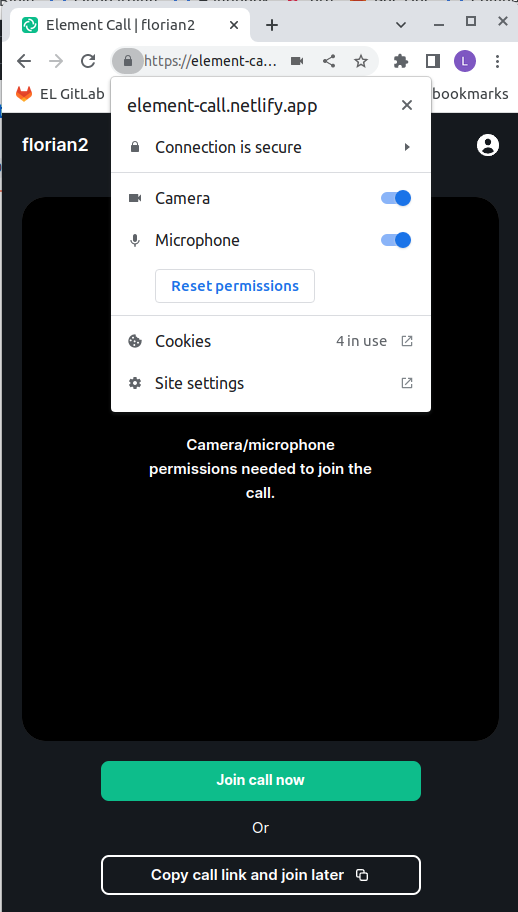
If the last camera used with Element call on an older Session was the external camera (Logitech). It will try to use that camera again in the next session. If I have started OBS, this camera is used already and Element Call displays the error above.
Please note that there is no option displayed to change the Element Call Video settings above. I just get the error message and a wrong error message as well. It would be great if it did not say missing permissions, but another process is using the camera instead.
### Outcome
#### What did you expect?
Element Call should display Error messages that help resolve the issue.
I need a way to configure element call to use a different camera when the current one is not accessible / an error is displayed.
#### What happened instead?
The error message made the settings menu inaccessible.
### Operating system
Ubuntu
### Browser information
Google Chrome Version 108.0.5359.71 (Official Build) (64-bit)
### URL for webapp
https://element-call.netlify.app/
### Will you send logs?
No
Contributor guide
Assessment
This issue has not been assessed yet.