element-hq / element-hq/element-android
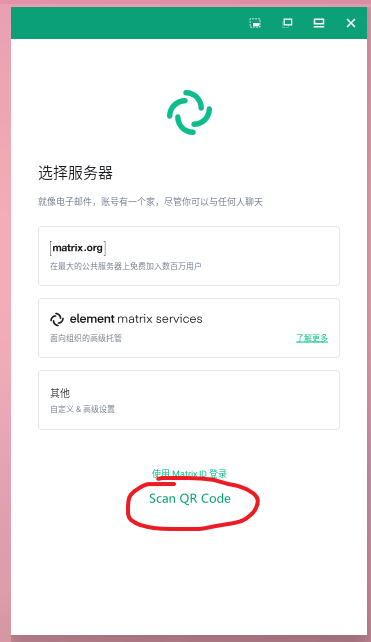
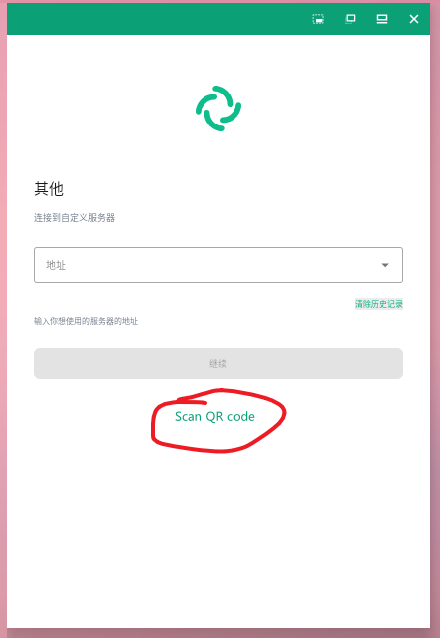
For custom servers, allow users to connect by scanning a QR code in Element.
- Dominant language
- Kotlin
- Stars
- 3.7k
- Forks
- 917
- PR merge metrics
- No merged PRs in 30d
Description
### Your use case
#### What would you like to do?
Avoid manual input when user logs in to some custom server with lengthy address.
#### Why would you like to do it?
To a certain extent, it saves the time consumed by configuring the server.
#### How would you like to achieve it?
As shown in the figure below, add an entry on the "Select Server" or "Enter Custom Server Address" page to allow users to scan the QR code.
If the parsing result of the QR code is the following address, it will automatically connect to the specified URL.
`https://mobile.element.io/?hs_url=https://example.com:[port]`
### Have you considered any alternatives?
I'm currently using a third-party QR code scanner to scan `https://mobile.element.io/?hs_url=https://example.com:[port]` and call Element to parse this link.
The disadvantage of this solution is that it requires additional installation of third-party scanners.
### Additional context
n/a
Contributor guide
Assessment
This issue has not been assessed yet.