elastic / elastic/fleet-server
Add a tool for recovering agents and API keys from a snapshot
- Dominant language
- Go
- Stars
- 113
- Forks
- 117
- Avg merge
- 1d 16h
- Merged PRs (30d)
- 112
Description
We've had a few SDH cases where the unenrollment timeout functionality executed by Fleet Server gets triggered in an undesirable situation, leading to 1000s of agents being unenrolled with no way to recover them.
I have a very hacky workaround that allows recovering these agents from a snapshot. We could turn this into a CLI tool that users could use to recover from these situations.
Here is the instructions I gave (and have tested personally):
# ⚠️ Warning ⚠️
This is not officially supported. While I was able to successfully get this to work with these steps, I don't know if there are any other side effects that we should be aware of before proceeding.
# Steps to restore an Agent unenrolled by timeout
At a high level, the basic steps are:
1. Take a new snapshot of the `.fleet-*` and `.security*` indices before doing anything
2. Remove the unenrollment timeout for the Agent policy before doing these steps
3. Restore the API key from a snapshot and set it to active again - **this is the trickiest part**
4. Update the document `.fleet-agents` to re-enable the Agent
5. Re-set the unenrollment timeout (if desired)
6. Cleanup
## Take a new snapshot
This should be done for the indices we're going to be touching here before we do anything else. We need snapshots of the `.fleet*` and `.security*` index patterns. For example, on Cloud this could be done with the following API call:
```
PUT /_snapshot/found-snapshots/manual-fleet-security-backup?wait_for_completion=true
{
"indices": ".security*,.fleet*",
"expand_wildcards": "all",
"ignore_unavailable": false,
"include_global_state": false,
"metadata": {
"taken_because": "backup before fixing Fleet agents"
}
}
```
## Remove the unenrollment timeout
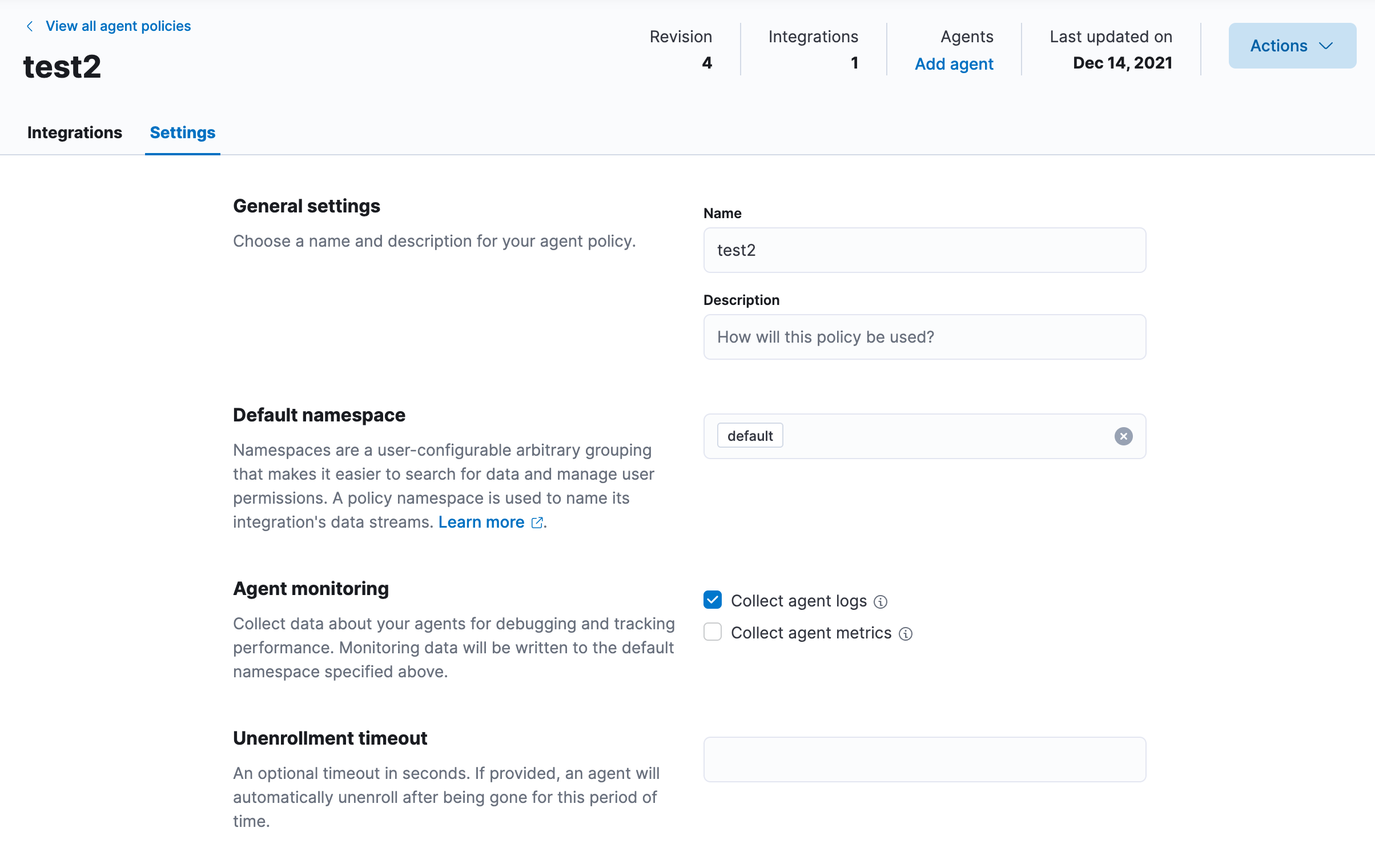
This can be done in the Fleet UI and should be done for each Agent policy that we need to restore Agents in. This can be re-enabled after getting the Agents working again. Simply remove the value from the "Unenrollment timeout" on the Settings tab for each Agent policy as such:
## Restore the API key from a snapshot and set it to active
Since the API keys have long been invalidated, we'll need to:
- Mount a snapshot of the `.security-7` index
- Reindex the API key document from the restored index to the live index + set the api_key_invalidated field to false
### Mount a snapshot of the security index
```
# Should use the correct snapshot name in place of `cloud-snapshot-...` to point to a snapshot at a point in time where the Agent wasn't unenrolled.
POST /_snapshot/found-snapshots/cloud-snapshot-2021.12.14-bj98hryaq4yipgenhtkzfg/_mount?wait_for_completion=true
{
"index": ".security-7",
"renamed_index": "security-restore-temp",
"index_settings": {
"index.number_of_replicas": 0
}
}
```
### Retrieve the old API key and set it to valid again (single Agent)
This will restore and reactivate the API key for a single Agent based on the Agent ID provided in the query. The Agent's ID can be found by searching the `.fleet-agents` index first for the invalidated Agent you wish to restore. For example, you can find a agent by hostname with the following query:
```
POST .fleet-agents/_search?filter_path=hits.hits._id
{
"query": {
"bool": {
"must": [
{
"term": {
"local_metadata.host.hostname": {
"value": "my-host"
}
}
},
{
"term": {
"active": {
"value": false
}
}
}
]
}
}
}
```
You can then use that Agent ID in this reindex to restore it's API key:
```
POST _reindex?wait_for_completion=true
{
"source": {
"index": "security-restore-temp",
"query": {
"bool": {
"must": [
{
"term": {
"metadata_flattened.agent_id": {
"value": "ae2f467e-a8e2-455a-b0a4-7478fb4cf8e5"
}
}
}
]
}
}
},
"dest": {
"index": ".security-7"
},
"script": {
"source": """
ctx._source['api_key_invalidated'] = false;
ctx._source['expiration_time'] = null;
""",
"lang": "painless"
}
}
```
### Retrieve all old Agent API keys and set them to valid again
I don't necessarily recommend doing this as it definitely could have destructive impact or create dangling API keys that are not in use by anything which is a security risk (see cleanup step for how to find and remove these). However since this user has 1000+ agents, this may be of value. I do recommend auditing for unused keys after getting everything working.
```
POST _reindex?wait_for_completion=true
{
"source": {
"index": "security-restore-temp",
"query": {
"bool": {
"must": [
{
"term": {
"doc_type": {
"value": "api_key"
}
}
},
{
"term": {
"metadata_flattened.managed_by": {
"value": "fleet-server"
}
}
}
]
}
}
},
"dest": {
"index": ".security-7"
},
"script": {
"source": "ctx._source['api_key_invalidated'] = false",
"lang": "painless"
}
}
```
## Update the document `.fleet-agents` to re-enable the Agent
This should trigger Fleet Server to start updating this Agent again:
```
POST .fleet-agents/_update/ae2f467e-a8e2-455a-b0a4-7478fb4cf8e5
{
"doc": {
"active": true,
"unenrolled_at": null,
"unenrolled_reason": null
}
}
```
This could also be done for all Agents that were unenrolled by timeout with this query:
```
POST .fleet-agents/_update_by_query?wait_for_completion=true
{
"query": {
"bool": {
"must": [
{
"term": {
"unenrolled_reason": {
"value": "timeout"
}
}
}
],
"must_not": [
{
"term": {
"policy_id": {
"value": "policy-elastic-agent-on-cloud"
}
}
}
]
}
},
"script": {
"source": """
ctx._source['active'] = true;
ctx._source['unenrolled_at'] = null;
ctx._source['unenrolled_reason'] = null;
""",
"lang": "painless"
}
}
```
## Re-set the unenrollment timeout (if desired)
If they'd like they can set the unenrollment timeout again on the Agent Policy in the Fleet UI, but they may not want to after going through all this pain.
## Cleanup & Verify
- Verify that data and logs are being retrieved for each affected Agent.
- Cleanup any potentially unused Fleet API keys (see below)
- Delete the restored snapshot security index:
```
DELETE security-restore-temp
```
### Cleanup any unused Fleet API keys
It's possible that some API keys are restored that aren't in use and won't be invalidated by Fleet depending on the timings of the security snapshot, etc. To fix this, the user will need to:
1. Query for all API key IDs managed by Fleet
2. Invalidate any API keys that are not in list from step (1)
```
POST .fleet-agents/_search?filter_path=hits.hits._source.agent.id&q=active:true%20-unenrolled_at:*
```
```
// Change to `.security/_delete_by_query` to execute delete action
POST .security/_search
{
"query": {
"bool": {
"must": [
{
"term": {
"doc_type": {
"value": "api_key"
}
}
},
{
"term": {
"metadata_flattened.managed_by": {
"value": "fleet-server"
}
}
}
],
"must_not": [
{
"terms": {
"metadata_flattened.agent_id": [
]
}
}
]
}
}
}
```
This bash script below should also do the trick, it will find all current Agent IDs and then delete any API keys that belong to inactive agents. It requires that `jq` is installed.
```
QUERY=`curl \
-XPOST \
"https://:/.fleet-agents/_search?filter_path=hits.hits._source.agent.id&q=active:true%20-unenrolled_at:*" \
-H 'Content-Type: application/json' \
-u : \
| jq -c '.hits.hits | map(._source.agent.id) | { query: { bool: { must: [{term: {doc_type: "api_key"}}, {term: {"metadata_flattened.managed_by": "fleet-server"}}], must_not: [{ terms: { "metadata_flattened.agent_id": .} }] }}}'`
curl \
-XPOST \
"https://:/.security/_delete_by_query" \
-H 'Content-Type: application/json' \
-u : \
-d$QUERY
```
Contributor guide
Assessment
This issue has not been assessed yet.