eclipsesource / eclipsesource/tabris-js
Cannot implement iOS HIG-compliant back button
- Dominant language
- JavaScript
- Stars
- 1.4k
- Forks
- 171
- PR merge metrics
- No merged PRs in 30d
Description
### Problem description
Back buttons on iOS [often show a label with the title of the previous screen](https://developer.apple.com/design/human-interface-guidelines/ios/bars/navigation-bars/):
> When a new screen is displayed, a back button, often labeled with the title of the previous screen, appears on the left side of the bar.
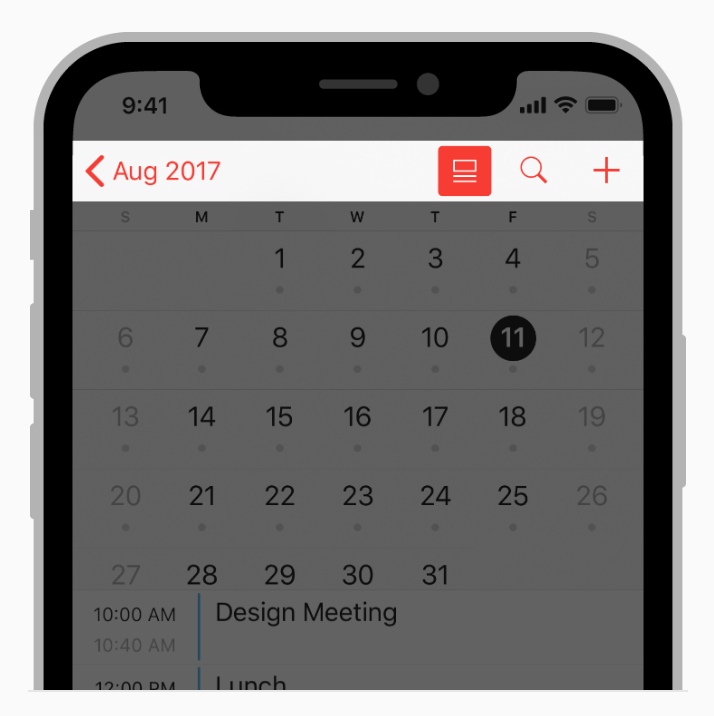
(image source: https://developer.apple.com/design/human-interface-guidelines/ios/bars/navigation-bars)
The default back navigation action in Tabris.js behaves like that as well:
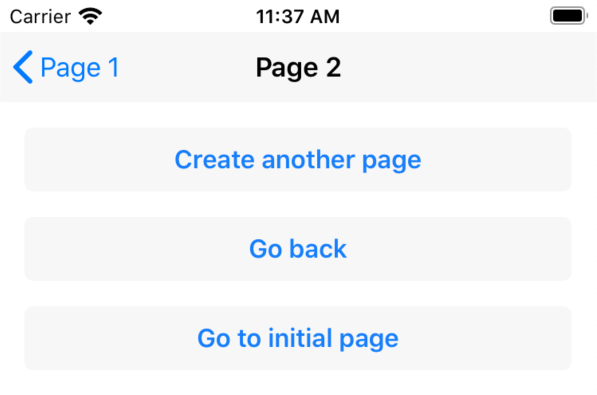
When using a custom action with `placement` set to `"navigation"`, the action will currently only display an image. The title text of the action is not rendered when set together with an image.
### Expected behavior
It should be possible to set both navigation title and image to be able to implement a custom back navigation button according to Apple's HIG.
### Environment
- Tabris.js version: 3.3
- OS: iOS
### Code snippet
Modified the navigationview-action-placement.jsx snippet for the navigation action to include both an image and a title:
```javascript
import {Action, NavigationView, contentView, device} from 'tabris';
contentView.append(
);
function getImage(image) {
return 'resources/' + image + (device.platform === 'iOS' ? '-black-24dp@3x.png' : '-white-24dp@3x.png');
}
```
Contributor guide
Research direction
Start with the modified navigationview-action-placement.jsx example and inspect how an Action with placement='navigation' is rendered on iOS. Reproduce the case with both title='Last Page' and an image, then verify that the navigation button displays both elements while preserving the existing default and overflow actions.
Written by the indexing model from the issue text.
Assessment
- Tech stack
- ios, javascript
- Domain
- mobile
- Issue type
- Bug
- Difficulty
- 4/5
- Estimated time
- 3-5 days
- Activity status
- Stale
- Clarity
- Mostly clear
- Newbie friendliness
- 40/100