eclipse-jdt / eclipse-jdt/eclipse.jdt.ui
Outline view does not show Record component accessors
- Dominant language
- Java
- Stars
- 59
- Forks
- 127
- Avg merge
- 23h 30m
- Merged PRs (30d)
- 35
Description
The Outline view does not show the record component accessor methods.
I tried unticking the Synthetic members, does not make a difference. This is annoying because normally I have fields filtered out and only see methods which is now not possible for records.
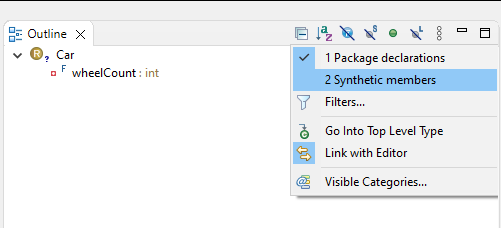
```
public record Car(int wheelCount) {}
```
(This got separated from https://github.com/eclipse-jdt/eclipse.jdt.ui/issues/571 which tried using Call Hierarchy on record components.)
Contributor guide
Research direction
Start by reproducing the issue in the Outline view with the provided `public record Car(int wheelCount) {}` example, both with Synthetic members enabled and disabled. Compare the displayed members with the record component accessor methods and use the related issue #571 for context. Done means the Outline view shows those accessors while preserving the existing field-filtering behavior.
Written by the indexing model from the issue text.
Assessment
- Tech stack
- java
- Domain
- developer-experience
- Issue type
- Bug
- Difficulty
- 3/5
- Estimated time
- 1-2 days
- Activity status
- Stale
- Clarity
- Mostly clear
- Newbie friendliness
- 35/100