eclipse-jdt / eclipse-jdt/eclipse.jdt.ui
USE_COLORED_LABELS=false makes Package Explorer text invisible under certain interaction
- Dominant language
- Java
- Stars
- 59
- Forks
- 127
- Avg merge
- 22h 47m
- Merged PRs (30d)
- 28
Description
Hey, I finally managed to track down this bug i was having:
Bug: All text in Package Explorer disappears except the currently selected/highlighted item. (See Video)
Cause: Config setting USE_COLORED_LABELS=false in
\.metadata\.plugins\org.eclipse.core.runtime\.settings\org.eclipse.ui.prefs
Reproduction:
1. Set USE_COLORED_LABELS=false
2. Move Package-Explorer into its own window
3. Open a .java file
4. Make sure the .java file is highlighted/selected in Package Explorer
5. Click into the Open java file to loose focus from Package Explorer window (java-file is still highlighted)
6. Click exactly on the selected/opened java file within the Package Explorer
7. (Clicking on any other file will not cause the problem)
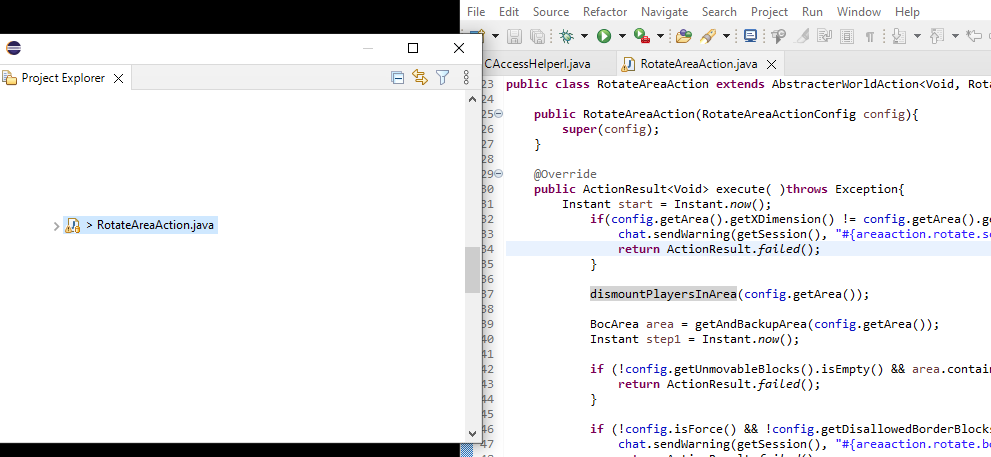
https://user-images.githubusercontent.com/152798/194727078-eb749b60-6177-4ed6-a135-0ba94896e816.mp4
Contributor guide
Assessment
This issue has not been assessed yet.