eclipse-jdt / eclipse-jdt/eclipse.jdt.ui
Offer "Open Call Hierarchy" on mouse hover menu for methods
- Dominant language
- Java
- Stars
- 59
- Forks
- 127
- Avg merge
- 22h 47m
- Merged PRs (30d)
- 28
Description
In Intellij Idea the default behavior for Ctrl+Click on a method name in a method definition is to show all usages / references.
I think it is intuitive to offer a quick way to show usages / references in this context and since I used Idea for a project for a bit I miss this option in Eclipse.
To be added here:

Currently reachable with right click:
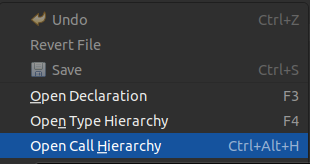
I could even see also adding "Open Type Hierarchy" and removing "Open Return Type" as the return type is available to Ctrl+Mouse1 just a few pixels away. I personally can't see many people using "Open Return Type" but maybe I'm totally off base there.

cc @vogella
Contributor guide
Assessment
This issue has not been assessed yet.