eclipse-jdt / eclipse-jdt/eclipse.jdt.ui
Provide a more up-to-date list of default/promoted views/perspectives
- Dominant language
- Java
- Stars
- 59
- Forks
- 127
- Avg merge
- 22h 47m
- Merged PRs (30d)
- 28
Description
Installing a fresh release of the Eclipse Java IDE brings the following "new view" menu:
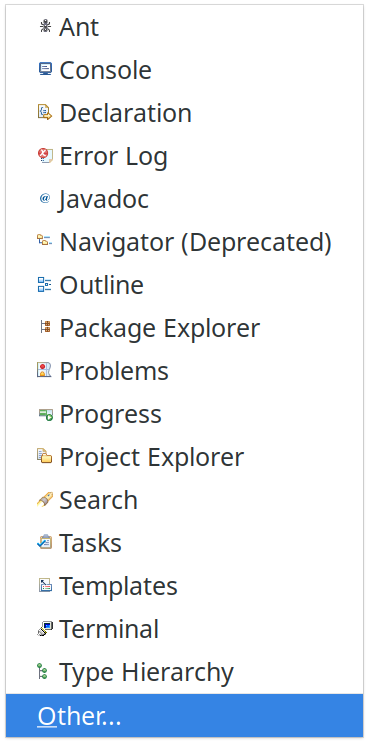
Ant as the first entry (I know `A` goes first, but you could hide this under "others" by now). This (and others) take up space for the other great stuff hidden in the "Others" dialog.
Same for perspectives, this is UI flow I need to perform in order to get a dialog which allows me to go to the Git perspective:
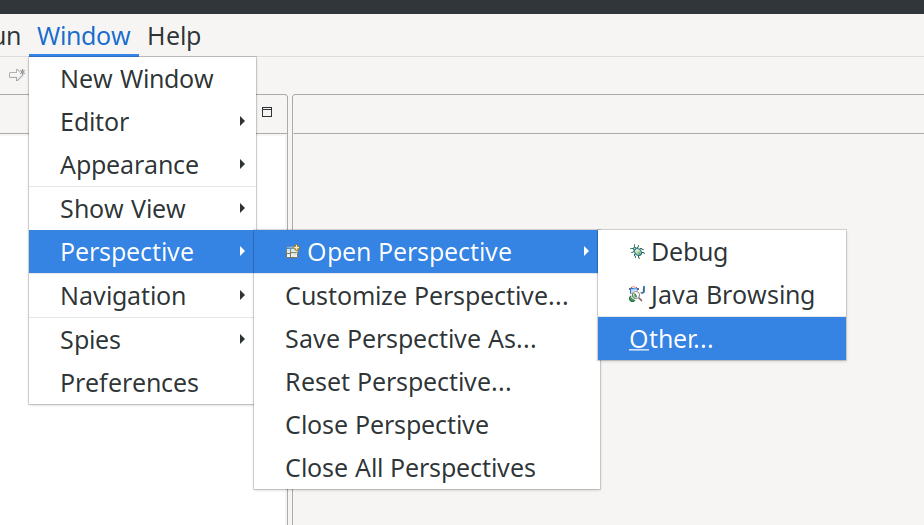
I know I can click on the tiny plus icon too … but still, views are there, perspectives too. So that should be a bit more usable IMHO.
At least there should be a more reasonable choice of perspectives presented.
Contributor guide
Assessment
This issue has not been assessed yet.