eclipse-jdt / eclipse-jdt/eclipse.jdt.core
eclipse ant build for 'Separate JRE jdk1.6.0_45' returns error Could not find the main class: org.eclipse.ant.internal.launching.remote InternalAntRunner.
- Dominant language
- Java
- Stars
- 237
- Forks
- 195
- Avg merge
- 1d 10h
- Merged PRs (30d)
- 49
Description
Version: 2022-06 (4.24.0)
Build id: 20220609-1112
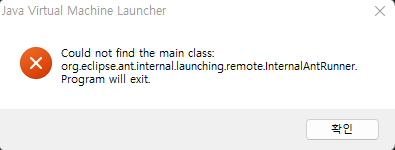
I'm setting JRE in 'External Tools Configuration',

if I go with 'Run in the same JRE as the workspace', ant build wth 'JVM detail version: 17.0.3' and build failed. I need lower JRE for source option 5.
I have had success in cmd with equal JRE, ant version.
Contributor guide
Research direction
Reproduce the Ant build from Eclipse 2022-06 with the separate JRE set to jdk1.6.0_45, using the External Tools Configuration shown in the report. Compare it with the workspace JRE and the successful command-line Ant run; done means the separate-JRE build launches without the InternalAntRunner main-class error and supports the required source option.
Written by the indexing model from the issue text.
Assessment
- Tech stack
- java
- Domain
- build-system, tooling
- Issue type
- Bug
- Difficulty
- 4/5
- Estimated time
- 3-5 days
- Activity status
- Stale
- Clarity
- Mostly clear
- Newbie friendliness
- 35/100