eclipse-cdt-cloud / eclipse-cdt-cloud/theia-trace-extension
Clarify where the trace viewer tab is in live demo
- Dominant language
- TypeScript
- Stars
- 50
- Forks
- 60
- PR merge metrics
- No merged PRs in 30d
Description
Since the live demo opens a full Theia IDE with the extension, it's difficult to figure out that you access the Trace Viewer through the sidebar.
Is there some way we could clarify where the Trace Viewer is?
* Automatically open the Trace Viewer tab when the application is opened?
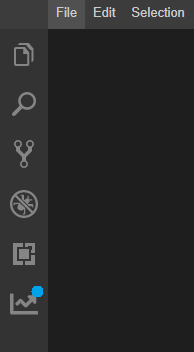
* Somehow draw attention to the trace viewer tab (ex. Show a notification dot on the tab)?
Notification dot (blue):
----
CC: @ssmagula
Contributor guide
Research direction
Start by locating the live demo startup configuration and the Trace Viewer sidebar contribution described in the issue. Compare the proposed ways to make the viewer discoverable, then verify in the live demo that a new user can find and open the Trace Viewer without guesswork.
Written by the indexing model from the issue text.
Assessment
- Tech stack
- typescript
- Domain
- frontend
- Issue type
- Feature
- Difficulty
- 4/5
- Estimated time
- 3-5 days
- Activity status
- Stale
- Clarity
- Mostly clear
- Newbie friendliness
- 35/100