eclipse-cdt-cloud / eclipse-cdt-cloud/theia-trace-extension
Clarify that yarn command is the intended server download method
Nobody has claimed this yet.
- Dominant language
- TypeScript
- Stars
- 50
- Forks
- 60
- PR merge metrics
- No merged PRs in 30d
Description
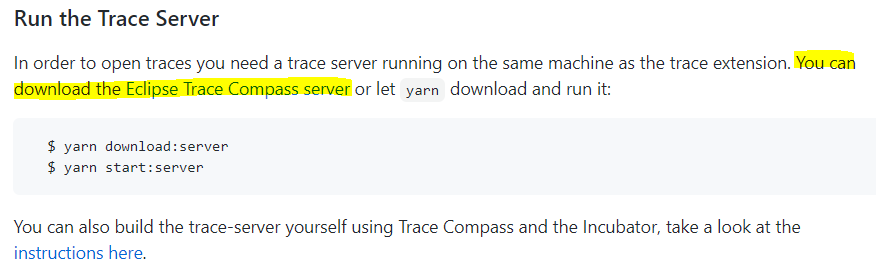
When building from source, in the "Run the Trace Server" readme section, the first option the user is offered is manually downloading the server. This implies that this is the intended option or at least an equivalent option to using the "yarn download:server" command which it is not. Since users aren't told where where the app is running from or where to put the server file to get the default path to work, manually downloading should not be the first option.
- Move manual server download text after the yarn commands to imply it's an alternative
- Specify the correct placement of the server (theia-trace-extension/trace-compass-server), the correct server path (../../theia-trace-extension/trace-compass-server), where the app runs from (examples/<browser, electron>)
Contributor guide
First steps
- Read the whole issue, then the project's contributing guide.
- Comment on the issue to say you are picking it up — it saves two people doing the same work.
- Fork the repository and make your change on a branch.
- Open a pull request that references the issue number.
Research direction
Start with the README's "Run the Trace Server" section and compare the yarn download commands with the manual-download instructions. Confirm that the yarn commands come first, then document the server placement at the specified path, the relative server path, and the examples/<browser,electron> working locations; the section should clearly present manual download as an alternative.
Written by the indexing model from the issue text.
Assessment
- Domain
- documentation
- Issue type
- Documentation
- Difficulty
- 2/5
- Estimated time
- 1-3 hours
- Activity status
- Stale
- Clarity
- Clearly specified
- Newbie friendliness
- 45/100