dsccommunity / dsccommunity/SqlServerDsc
SqlAGListener: Error causing Listener Port number to be deleted.
Nobody has claimed this yet.
- Dominant language
- PowerShell
- Stars
- 385
- Forks
- 224
- PR merge metrics
- No merged PRs in 30d
Description
Details of the scenario you tried and the problem that is occurring
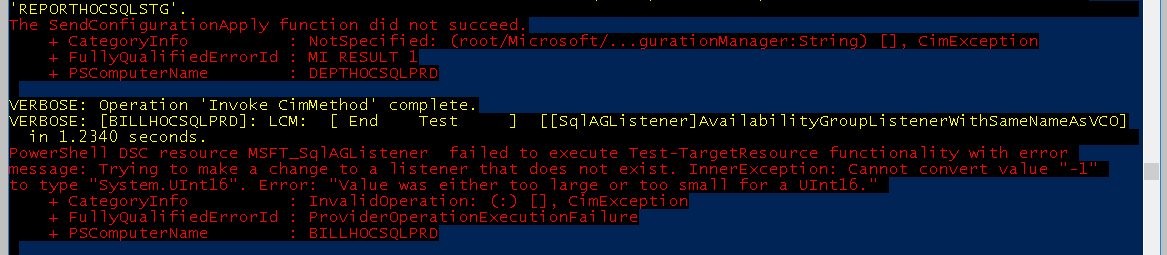
When running my DSC Script for configuring AGs for SQL Server I started receiving an error on Servers that already had the listener configured.
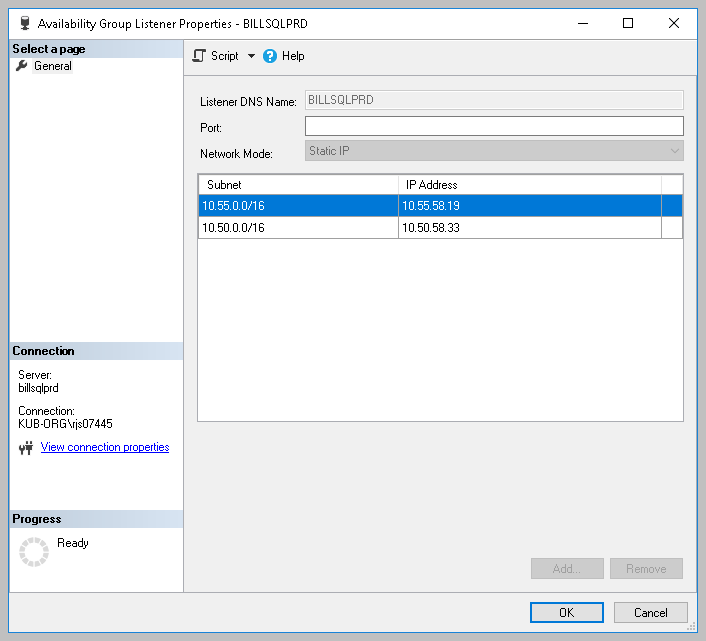
When I check the SQL Server through management studio the listener no longer had the default 1433 port number listed.
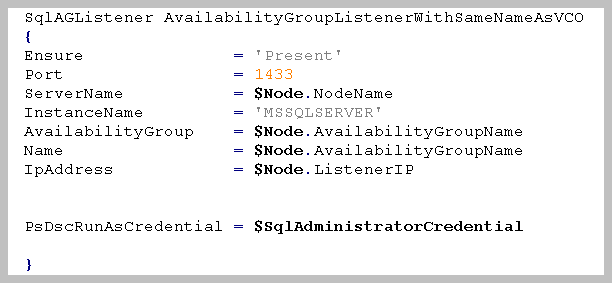
Here is a screenshot of the SQLAGListener Section of my configuration script.
Verbose logs showing the problem
Suggested solution to the issue
The DSC configuration that is used to reproduce the issue (as detailed as possible)
Configuration SQLAG
{
    param(
        [Parameter(Mandatory = $true)]
        [System.Management.Automation.PSCredential]
        $SqlAdministratorCredential
    )


	 Import-DscResource -ModuleName SqlServerDsc
    Node $AllNodes.NodeName
    {

        # Adding the required service account to allow the cluster to log into SQL
        SqlServerLogin AddNTServiceClusSvc
        {
            Ensure               = 'Present'
            Name                 = 'NT SERVICE\ClusSvc'
            LoginType            = 'WindowsUser'
            ServerName           = $Node.NodeName
            InstanceName         = $Node.InstanceName
            PsDscRunAsCredential = $SqlAdministratorCredential

        }

        # Add the required permissions to the cluster service login
        SqlServerPermission AddNTServiceClusSvcPermissions
        {
            DependsOn            = '[SqlServerLogin]AddNTServiceClusSvc'
            Ensure               = 'Present'
            ServerName           = $Node.NodeName
            InstanceName         = $Node.InstanceName
            Principal            = 'NT SERVICE\ClusSvc'
            Permission           = 'AlterAnyAvailabilityGroup', 'ViewServerState', 'ConnectSQL'

            PsDscRunAsCredential = $SqlAdministratorCredential
        }
		WindowsFeature FailoverFeature
		{
		Ensure = "Present"
		Name   = "Failover-Clustering"
		DependsOn ='[SqlServerPermission]AddNTServiceClusSvcPermissions'


		}
		WindowsFeature RSATCLUSTERINGPOWERSHELL
		{
		Ensure  = "Present"
		Name	= "RSAT-Clustering-Powershell"
		DependsOn ='[WindowsFeature]FailoverFeature'


		}
		WindowsFeature RSATCLUSTERINGMGMT
		{
		Ensure  = "Present"
		Name    = "RSAT-Clustering-Mgmt"
		DependsOn ='[WindowsFeature]FailoverFeature'


		}
		WindowsFeature RSATCLUSTERINGCMDINTERFACE
		{
		Ensure   = "Present"
		Name	 = "RSAT-Clustering-CmdInterface"
		DependsOn ='[WindowsFeature]RSATCLUSTERINGPOWERSHELL'


		}

        # Create a DatabaseMirroring endpoint
        SqlServerEndpoint HADREndpoint
        {
            EndPointName         = 'HADR'
            Ensure               = 'Present'
            Port                 = 5022
            ServerName           = $Node.NodeName
            InstanceName         = $Node.InstanceName
			PsDscRunAsCredential = $SqlAdministratorCredential
        }

        SqlAlwaysOnService EnableHADR
        {
            Ensure               = 'Present'
			ServerName           = $Node.NodeName
            InstanceName         = $Node.InstanceName
            PsDscRunAsCredential = $SqlAdministratorCredential
        }

        if ( $Node.Role -eq 'PrimaryReplica' )
        {
            # Create the availability group on the instance tagged as the primary replica
            SqlAG AddTestAG
            {
                Ensure               = 'Present'
                Name                 = $Node.AvailabilityGroupName
                InstanceName         = $Node.InstanceName
                ServerName           = $Node.NodeName
				FailoverMode 		 = $Node.FailoverMode
				AutomatedBackupPreference = 'Primary'
				DatabaseHealthTrigger = $TRUE
				AvailabilityMode	 ='SynchronousCommit'
				DependsOn            = '[SqlAlwaysOnService]EnableHADR', '[SqlServerEndpoint]HADREndpoint', '[SqlServerPermission]AddNTServiceClusSvcPermissions'
                PsDscRunAsCredential = $SqlAdministratorCredential
            }
			SqlAGListener AvailabilityGroupListenerWithSameNameAsVCO
			{
            Ensure               = 'Present'
			Port 				 = 1433
            ServerName           = $Node.NodeName
            InstanceName         = 'MSSQLSERVER'
            AvailabilityGroup    = $Node.AvailabilityGroupName
            Name                 = $Node.AvailabilityGroupName
            IpAddress 			 = $Node.ListenerIP


			PsDscRunAsCredential = $SqlAdministratorCredential

			}


		}

        if ( $Node.Role -eq 'SecondaryReplica' )
        {
            # Add the availability group replica to the availability group

		SqlWaitForAG SQLConfigureAG-WaitAGTest1
        {
            Name                 = $Node.AvailabilityGroupName
            RetryIntervalSec     = 15
            RetryCount           = 2

            PsDscRunAsCredential = $SqlAdministratorCredential
        }


		   SqlAGReplica AddReplica
            {
                Ensure                     = 'Present'
                Name                       = $Node.NodeName
                AvailabilityGroupName      = $Node.AvailabilityGroupName
                FailoverMode 		   = $Node.FailoverMode
		AvailabilityMode 	   = $Node.AvailabilityMode
		ServerName                 = $Node.NodeName
                InstanceName               = 'MSSQLSERVER'
                ReadOnlyRoutingList		   = $Node.ReadOnlyRoutingList
				PrimaryReplicaServerName   = ( $AllNodes | Where-Object { $_.Role -eq 'PrimaryReplica' -and $_.AvailabilityGroupName -eq $Node.AvailabilityGroupName } ).NodeName
                PrimaryReplicaInstanceName = ( $AllNodes | Where-Object { $_.Role -eq 'PrimaryReplica' -and $_.AvailabilityGroupName -eq $Node.AvailabilityGroupName  } ).InstanceName
                DependsOn                  = '[SqlAlwaysOnService]EnableHADR'
                ProcessOnlyOnActiveNode    = $Node.ProcessOnlyOnActiveNode
				PsDscRunAsCredential = $SqlAdministratorCredential
            }
        }

	}

}
SQL Server edition and version the target node is running
Microsoft SQL Server 2017 (RTM-CU13) (KB4466404) - 14.0.3048.4 (X64) Nov 30 2018 12:57:58 Copyright (C) 2017 Microsoft Corporation Enterprise Edition: Core-based Licensing (64-bit) on Windows Server 2016 Standard 10.0 (Build 14393: ) (Hypervisor)
SQL Server PowerShell modules present on the target node
Name Version Path
sqlserver 21.0.17240 C:\Program Files\WindowsPowerShell\Modules\sqlserver\21.0.17240\sqlserver.psd1
SQLPS 14.0 C:\Program Files (x86)\Microsoft SQL Server\140\Tools\PowerShell\Modules\SQLPS\SQLPS.psd1
The operating system the target node is running
OsName : Microsoft Windows Server 2016 Standard
OsOperatingSystemSKU : StandardServerEdition
OsArchitecture : 64-bit
WindowsBuildLabEx : 14393.2758.amd64fre.rs1_release_1.190104-1904
OsLanguage : en-US
OsMuiLanguages : {en-US}
Version and build of PowerShell the target node is running
Name Value
PSVersion 5.1.14393.2758
PSEdition Desktop
PSCompatibleVersions {1.0, 2.0, 3.0, 4.0...}
BuildVersion 10.0.14393.2758
CLRVersion 4.0.30319.42000
WSManStackVersion 3.0
PSRemotingProtocolVersion 2.3
SerializationVersion 1.1.0.1
Version of the DSC module that was used ('dev' if using current dev branch)
SqlServerDsc 12.0.0.0
Contributor guide
First steps
- Read the whole issue, then the project's contributing guide.
- Comment on the issue to say you are picking it up — it saves two people doing the same work.
- Fork the repository and make your change on a branch.
- Open a pull request that references the issue number.
Research direction
Start with the SqlAGListener resource and reproduce the supplied DSC configuration against SQL Server 2017 using SqlServerDsc 12.0.0.0. Compare the listener before and after applying the configuration; done means the existing listener retains port 1433 and the error no longer removes it.
Written by the indexing model from the issue text.
Assessment
- Tech stack
- powershell, sql
- Domain
- databases, devops
- Issue type
- Bug
- Difficulty
- 4/5
- Estimated time
- 3-5 days
- Activity status
- Stale
- Clarity
- Mostly clear
- Newbie friendliness
- 30/100