dsccommunity / dsccommunity/SharePointDsc
SPUserProfileSyncConnection: fails to select specific OU
Open
Nobody has claimed this yet.
bug
help wanted
needs investigation
- Dominant language
- C#
- Stars
- 246
- Forks
- 106
- PR merge metrics
- No merged PRs in 30d
Description
Details of the scenario you tried and the problem that is occurring
I am trying to configure connection with only specific OUs. For example, I am trying to sync only "Production Users" OU. However, as result, I have all domain OUs added to connection:
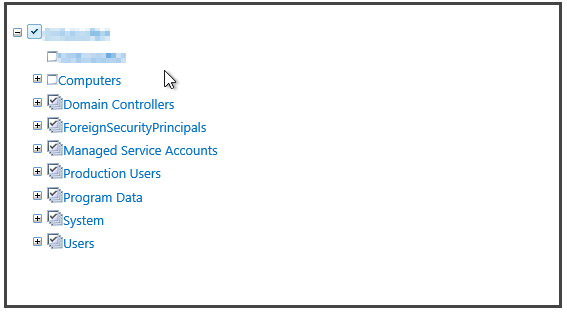
Verbose logs showing the problem
VERBOSE: [batch01]: LCM:  [ Start  Resource ]  [[SPUserProfileSyncConnection]contoso]
VERBOSE: [batch01]: LCM:  [ Start  Test     ]  [[SPUserProfileSyncConnection]contoso]
VERBOSE: [batch01]:                            [[SPUserProfileSyncConnection]contoso] Testing for user profile service
 sync connection contoso_local
VERBOSE: [batch01]:                            [[SPUserProfileSyncConnection]contoso] Getting user profile service
sync connection contoso_local
VERBOSE: [batch01]:                            [[SPUserProfileSyncConnection]contoso] Executing as the local run as
user contoso\_spadm16
VERBOSE: [batch01]:                            [[SPUserProfileSyncConnection]contoso] Leaving BeginProcessing Method
of Get-SPServiceApplication.
VERBOSE: [batch01]:                            [[SPUserProfileSyncConnection]contoso] Leaving ProcessRecord Method of
Get-SPServiceApplication.
VERBOSE: [batch01]:                            [[SPUserProfileSyncConnection]contoso] Leaving EndProcessing Method of
Get-SPServiceApplication.
VERBOSE: [batch01]:                            [[SPUserProfileSyncConnection]contoso] Getting SPContext for Proxy
group SPServiceApplicationProxyGroup
VERBOSE: [batch01]: LCM:  [ End    Test     ]  [[SPUserProfileSyncConnection]contoso]  in 5.4220 seconds.
VERBOSE: [batch01]: LCM:  [ Start  Set      ]  [[SPUserProfileSyncConnection]contoso]
VERBOSE: [batch01]:                            [[SPUserProfileSyncConnection]contoso] Setting user profile service
sync connection contoso_local
VERBOSE: [batch01]:                            [[SPUserProfileSyncConnection]contoso] UseSSL is not specified.
Assuming that SSL is not required.
VERBOSE: [batch01]:                            [[SPUserProfileSyncConnection]contoso] UseDisabledFilter is not
specified. Assuming that disabled accounts should not be filtered.
VERBOSE: [batch01]:                            [[SPUserProfileSyncConnection]contoso] Executing as the local run as
user contoso\_spadm16
VERBOSE: [batch01]:                            [[SPUserProfileSyncConnection]contoso] Importing function
'Get-SPDSCADSIObject'.
VERBOSE: [batch01]:                            [[SPUserProfileSyncConnection]contoso] Importing function
'Get-TargetResource'.
VERBOSE: [batch01]:                            [[SPUserProfileSyncConnection]contoso] Importing function
'Set-TargetResource'.
VERBOSE: [batch01]:                            [[SPUserProfileSyncConnection]contoso] Importing function
'Test-TargetResource'.
VERBOSE: [batch01]:                            [[SPUserProfileSyncConnection]contoso] Leaving BeginProcessing Method
of Get-SPServiceApplication.
VERBOSE: [batch01]:                            [[SPUserProfileSyncConnection]contoso] Leaving ProcessRecord Method of
Get-SPServiceApplication.
VERBOSE: [batch01]:                            [[SPUserProfileSyncConnection]contoso] Leaving EndProcessing Method of
Get-SPServiceApplication.
VERBOSE: [batch01]:                            [[SPUserProfileSyncConnection]contoso] Getting SPContext for Proxy
group SPServiceApplicationProxyGroup
VERBOSE: [batch01]:                            [[SPUserProfileSyncConnection]contoso] retrieving
UserProfileConfigManager
VERBOSE: [batch01]:                            [[SPUserProfileSyncConnection]contoso] Creating a new connection
VERBOSE: [batch01]: LCM:  [ End    Set      ]  [[SPUserProfileSyncConnection]contoso]  in 20.0440 seconds.
Suggested solution to the issue
none
The DSC configuration that is used to reproduce the issue (as detailed as possible)
            SPUserProfileSyncConnection contoso
            {
                UserProfileService      = "User Profile Service Application"
                Forest                  = "contoso.local"
                Name                    = "contoso_local"
                ConnectionCredentials   = $SPADSyncAccountCredential
                IncludedOUs             = @("OU=Production Users,DC=contoso,DC=local")
                ExcludedOUs             = @("CN=Computers,DC=contoso,DC=local")
                Force                   = $false
                ConnectionType          = "ActiveDirectory"
                PsDscRunAsCredential    = $SPInstallAccountCredential
            }
The operating system the target node is running
OsName               : Microsoft Windows Server 2012 R2 Datacenter
OsOperatingSystemSKU : DatacenterServerEdition
OsArchitecture       : 64-bit
WindowsBuildLabEx    : 9600.19153.amd64fre.winblue_ltsb.180908-0600
OsLanguage           : en-US
OsMuiLanguages       : {en-US}
Version of SharePoint that is used (e.g. SharePoint 2016)
SharePoint 2013
Version and build of PowerShell the target node is running
Name                           Value
----                           -----
PSVersion                      5.1.14409.1005
PSEdition                      Desktop
PSCompatibleVersions           {1.0, 2.0, 3.0, 4.0...}
BuildVersion                   10.0.14409.1005
CLRVersion                     4.0.30319.34014
WSManStackVersion              3.0
PSRemotingProtocolVersion      2.3
SerializationVersion           1.1.0.1
Version of the DSC module that was used ('dev' if using current dev branch)
2.6
Contributor guide
First steps
- Read the whole issue, then the project's contributing guide.
- Comment on the issue to say you are picking it up — it saves two people doing the same work.
- Fork the repository and make your change on a branch.
- Open a pull request that references the issue number.
Research direction
Start by locating the SPUserProfileSyncConnection resource and tracing how IncludedOUs and ExcludedOUs are applied when creating the SharePoint sync connection. Reproduce the issue with the supplied DSC configuration and verify that only the Production Users OU is selected while the excluded Computers container remains excluded.
Written by the indexing model from the issue text.
Assessment
- Tech stack
- powershell
- Domain
- backend
- Issue type
- Bug
- Difficulty
- 4/5
- Estimated time
- 3-5 days
- Activity status
- Stale
- Clarity
- Mostly clear
- Newbie friendliness
- 30/100