dropbox / dropbox/nautilus-dropbox
Copy to/Move to..., Create Folder incorrectly show current folder as subfolder
- Dominant language
- Python
- Stars
- 276
- Forks
- 68
- Avg merge
- 1d 22h
- Merged PRs (30d)
- 2
Description
Using dropbox v2015.10.28, [the last -but sadly very old- stable version](https://www.dropbox.com/download?dl=packages/ubuntu/dropbox_2015.10.28_amd64.deb).
1. Open Nautilus (tried with nautilus 1:3.18.4.is.3.14.3-0ubuntu5, GNOME nautilus 3.14.3, Ubuntu 16.04).
1. Pick any file, right-clic, _Move to..._ or _Copy to..._, it doesn't matter.
1. Select the destination folder: Go to any Dropbox folder/subfolder. Works correctly on any other destination folder, so this might be a bug on this nautilus-dropbox plugin.
1. Clic on "Create Folder" button. Type any name. Clic on _Create_.
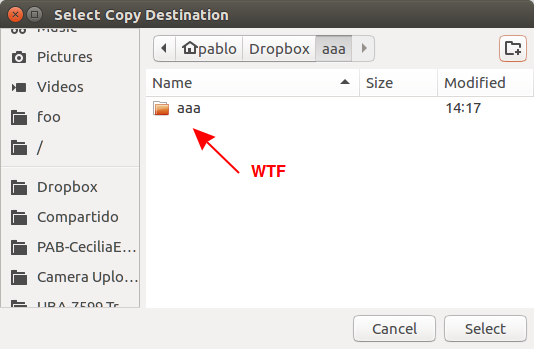
- **What happen:** The folder is created and path automatically change inside it, **but** incorrectly show the created folder also like another subfolder.
- **What was expected:** Same thing but without displaying oddly like a subfolder the current folder.
Take a look at below screenshots:

Contributor guide
No contributing guide indexed for this repository
Assessment
This issue has not been assessed yet.