Typography malfunctioning when Text contains Hangul characters
- Dominant language
- C#
- Stars
- 7.7k
- Forks
- 1.3k
- Avg merge
- 1d 11h
- Merged PRs (30d)
- 61
Description
### Description
When using a `TextBlock`, `Typography.*` does not work properly if `Text` contains Hangul letters.
Details:
* A "Hangul character" is one of any Hangul syllables, vowels and consonants, no matter contemporary or obsolete (옛한글). The full list is available at Wikipedia ([syllables](https://en.wikipedia.org/wiki/Hangul_Syllables), [vowels/consonants](https://en.wikipedia.org/wiki/List_of_Hangul_jamo)). "Hanyang Private Use" characters do not cause this problem.
* If the `Text` value contains a Hangul character, any character after it will not get affected by `Typography.*` properties, unless "blocked" by any character(s) with other types like:
* a CJK Ideograph (either unified or compatibility)
* a hiragana or a katakana
* a Latin character
* These types of character cannot be used for blocking:
* Hangul characters
* whitespaces
* punctuations
* digits
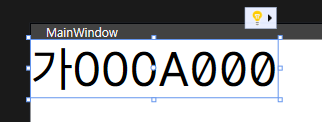
For example, if `Typography.*` properties are same as the repro below, `Text="가000A000"` looks like this: (Note the difference of `0`s with/without a slash in each)
### Reproduction Steps
```xaml
```
### Expected behavior
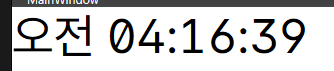
`Typography.*` should be applied.
Stylistic sets and their effects for *Pretendard Variable* are available from its [official page](https://cactus.tistory.com/306).
### Actual behavior
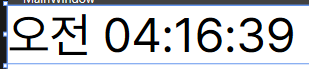
`Typography.*` are not applied.
### Regression?
_No response_
### Known Workarounds
The "Expected Behavior" shown above is achieved with a workaround like this:
```xaml
```
### Impact
_No response_
### Configuration
* Windows 10 version 22H2 (build 19045.2846) on x64
* .NET SDK 7.0.203 (retrieved from `dotnet --list-sdks`)
* Visual Studio 2022 version 17.5.4
* `#error version` tells `컴파일러 버전: '4.5.2-3.23171.7 (d17f7415)'. 언어 버전: 11.0.`
(translated into English: `Compiler version: '4.5.2-3.23171.7 (d17f7415)'. Language version: 11.0.`)
### Other information
_No response_
Contributor guide
Assessment
This issue has not been assessed yet.