Transparent child window renders as black when screen window sharing
- Dominant language
- C#
- Stars
- 7.7k
- Forks
- 1.3k
- Avg merge
- 1d 11h
- Merged PRs (30d)
- 61
Description
### Description
I try to add a transparent child window as a notification panel to the main window of a WPF application. However, I found that when using share window mode in communication software like Microsoft Teams to share the WPF application, if the child window background is set to transparent, other users will see a black screen. I have tested that other colors do not cause this issue. It is a known issue with WPF?
we try in .Net framework 4.8 and .Net Core 6 facing same problem
Look like sharing software captures the window and treats the transparent area as black.
Attempted scenarios (Share Window Mode):
Share child window with transparent background - black Screen
Share child window with red/blue background - No problem
Share Screen Mode - No problem
Share Window Mode - black Screen
On/Off Hardware Acceleration (transparent background) - black Screen
### Reproduction Steps
1. Create new .Net core 6 C# WPF application
2. Create child window for main window
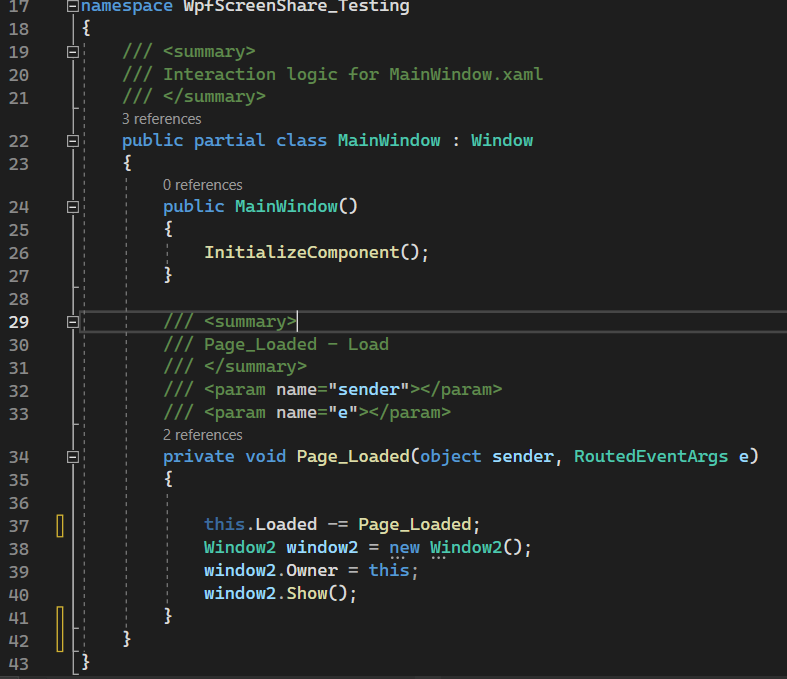
3. Set Property for child window
- AllowsTransparency="True"
- WindowStyle="None"
- Background="Transparent"
4. Run and Use Team to share window screen
### Expected behavior
Screen Share WPF Application properly
### Actual behavior
Child window with transparent background before Share Window Mode

Child window with transparent background after Share Window Mode

Child window with other color background before/after Share Window Mode

### Regression?
_No response_
### Known Workarounds
_No response_
### Impact
_No response_
### Configuration
.Net core 6
Window 11 22H2 22621.1555
x64
### Other information
related Issue
https://stackoverflow.com/questions/65514472/transparent-child-window-renders-as-black-when-screen-sharing-main-window-on-mic
Contributor guide
Assessment
This issue has not been assessed yet.