Negative TextIndent can lead to the LineVisual not being positioned correctly
- Dominant language
- C#
- Stars
- 7.7k
- Forks
- 1.3k
- Avg merge
- 1d 11h
- Merged PRs (30d)
- 61
Description
* .NET Core Version: 3.1 (likely any)
* Windows version: 21H2 (19044.1348)
* Does the bug reproduce also in WPF for .NET Framework 4.8?: Yes
* Is this bug related specifically to tooling in Visual Studio (e.g. XAML Designer, Code editing, etc...)? No
**Problem description:**
I'm using negative TextIndent to try and create a hanging indent. e.g. TextIndent="-80" Margin="400,0,0,0" If the container is not wide enough (e.g. at least 485 in this case regardless of the width of the remaining inlines in the paragraph) then the linevisual starts shifting left.
**Actual behavior:**
At width 425:
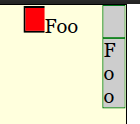
Notice how the paragraph below (which has the same margin but without the text indent and the inlineuicontainer that would occupy/fill that indented space) will wrap and get taller.
At width 455:

Once you make the container width enough then you start to see the content correctly placed. For example at width 485:

And at width 525:

**Expected behavior:**
The paragraph should appear like that of the 2nd paragraph. The 1st inline of the 1st paragraph takes up the entirety of the text indent and so the remaining inline(s) should be just like the one without the textindent.
**Minimal repro:**
```xaml
<Setter Property="FontSize" Value="20" />
<Setter Property="Background" Value="LightGray" />
<Setter Property="BorderBrush" Value="Green" />
<Setter Property="BorderThickness" Value="1" />
<Setter Property="Padding" Value="0" />
Pre
Foo
Foo
```
Contributor guide
Assessment
This issue has not been assessed yet.