Missing custom Popup content when opening for the second time in a large application
- Dominant language
- C#
- Stars
- 7.7k
- Forks
- 1.3k
- Avg merge
- 1d 11h
- Merged PRs (30d)
- 61
Description
## Problem description
This bug report is a simplified version of https://github.com/MaterialDesignInXAML/MaterialDesignInXamlToolkit/issues/2285.
If the XAML contains a sufficiently large number of elements with certain types, then the content of a `Popup` is not displayed when opening for the second time. One additional constraint is that the `Popup` is in the template of custom popup implementation. Another additional constraint is that the custom popup content must bind its `Visibility` and have the value match the `IsOpen` property of the custom popup (i.e. `true` means `Visible` and `false` means `Collapsed`).
## Steps to reproduce
1. Create a local fork of [TysonMN/MissingCustomPopupContent](https://github.com/TysonMN/MissingCustomPopupContent)
2. Checkout one of the following branches: [`CheckBox`](https://github.com/TysonMN/MissingCustomPopupContent/tree/CheckBox), [`ComboBox`](https://github.com/TysonMN/MissingCustomPopupContent/tree/ComboBox), [`RadioButton`](https://github.com/TysonMN/MissingCustomPopupContent/tree/RadioButton), or [`TextBox`](https://github.com/TysonMN/MissingCustomPopupContent/tree/TextBox)
3. Run the application
4. Click the button (that says `Open CustomPopup`)
5. Observe the button in the popup that says `Close CustomPopup`
6. Click on the button in the popup that says `Close CustomPopup`
7. Click the button again (that says `Open CustomPopup`)
Here are some additional details in case they matter.
* .NET SDK:
- Version: 5.0.201
- Commit: a09bd5c86c
* Windows version: 1909 (OS Build 18363.1440)
* Does the bug reproduce also in WPF for .NET Framework 4.8?: Yes
## Expected behavior
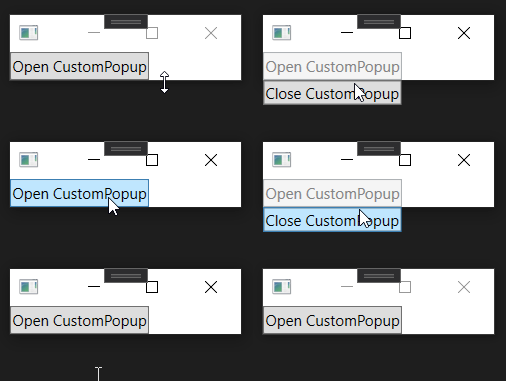
The button that says `Close CustomPopup` should be displayed (again, just like in step 5). It should look like this animated GIF, which I created using the branch [`main`](https://github.com/TysonMN/MissingCustomPopupContent/tree/main).
## Actual behavior
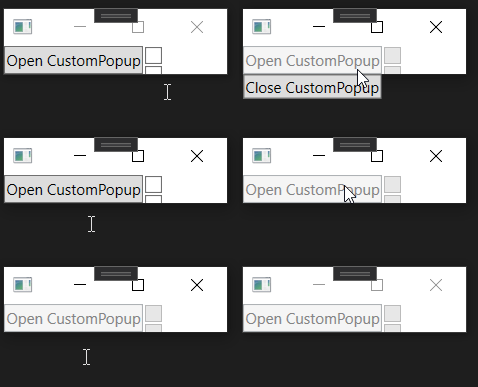
The button that says `Close CustomPopup` is not displayed. This animated GIF shows the actual behavior when using the branch `CheckBox`.
## Additional information
To help quantify how large is "sufficiently large", my reproduction repository contains several branches named after a type that extends `FrameworkElement`. Each branch forks from `main` and has two commits of its own. In the first comment, many of the corresponding element are added to the application. On these first commits, following the reproduction steps leads to the "expected behavior". In the second commit, an additional element of the same type is added. On these second commits, following the reproduction steps leads to the "actual behavior". For each element type, here are the quantities that give the expected and actual behaviors.
| Element Type | Expected Behavior | Actual Behavior |
| --------------- | -------------------- | ----------------- |
| [`CheckBox`](https://github.com/TysonMN/MissingDialogHostContent/tree/CheckBox) | 47 | 48 |
| [`ComboBox`](https://github.com/TysonMN/MissingDialogHostContent/tree/ComboBox) | 71 | 72 |
| [`RadioButton`](https://github.com/TysonMN/MissingDialogHostContent/tree/RadioButton) | 71 | 72 |
| [`TextBox`](https://github.com/TysonMN/MissingDialogHostContent/tree/TextBox) | 143 | 144 |
Interestingly, these numbers are different from what they were in my initial reproduction in https://github.com/MaterialDesignInXAML/MaterialDesignInXamlToolkit/issues/2285. This is not completely surprising though since Material Design in XAML has custom templates for each of those four element types.
I tried reproducing the actual behavior using other elements types, but the other cases were more confusing. I have a private reproduction in my application at work that involves `Button`s with its `Style` set to some `StaticResource` key, but I was unable to achieve the actual behavior via `Button`s without modifying their `Style`.
## Workarounds
In addition to having sufficiently few elements in the application, here are more changes to the code that lead to the expected behavior.
1. No `Visibility` binding on the `CustomPopupContent`.
2. Swapping the order of the two triggers (for `MyPopup` and `PrimaryContent`).
3. Removing the trigger for `PrimaryContent`.
Contributor guide
Assessment
This issue has not been assessed yet.