Window.Left and Window.Top are broken when usign PerMonitorV2
- Dominant language
- C#
- Stars
- 7.7k
- Forks
- 1.3k
- Avg merge
- 1d 11h
- Merged PRs (30d)
- 61
Description
* .NET Core Version: FW 4.8
* Windows version: 10.0.19042.746
* Does the bug reproduce also in WPF for .NET Framework 4.8?: Yes
### Example
In this example, the user is using Windows 10, the app is **PerMonitorV2** enabled and the user has two monitors, as shown below.

### Scaling Between WPF and Screen Sizes
A window can be freely moved between the available monitors and WPF automatically changes scaling and other parameters.
Depending on the window’s current monitor, WPF calculates the scaling factor between Screen and WPF sizes, and vice versa. To my knowledge, this works fine.

In the above example, the left window is on monitor 1, which has DPI of 144. This gives a scaling factor of: **144 / 96 = 1,5**. The right window is on monitor 2, which has DPI of 192. This gives a scaling factor of: **192 / 96 = 2,0**. Knowing the scaling factors, it is easy to calculate between the screen size and WPF sizes. For example, the right window has a width of 500 WPF units. This is **500 x 2.0 = 1000** pixels.
### Scaling Between WPF and Screen Positions – BROKEN
Similar to scaling of WPF sizes, we can try to scale between WPF and Screen positions, for example the window’s top-left corner.
The current buggy WPF implementation uses the scaling factor from the current monitor (see above) to calculate the top-left corner of the window.
Example for the left window. Left: **375 pixels / 1,5 = 250** WPF units. This is correct. To position the window on the screen, we need to calculate from WPF to Screen units. This is trickier, as we don’t know on which screen 250 WPF units is. This could be on monitor 1 or monitor 2. For now, we assume monitor 1. Screen-left: **250 WPF units * 1,5 = 375**.
Example for the right window: Left: **2200 pixel / 2,0 = 1100** WPF units. To calculate the other way, WPF needs to figure out on which monitor **1100** WPF units is. It starts enumerating monitors to try to find one that will work.
• Monitor 1: **1100 * 1,5 = 1650**. Monitor has bounds **0..1500**. 1650 is outside the bounds.
• Monitor 2: **1100 * 2,0 = 2200**. Monitor has bounds **1500..3500**. 2200 is inside the bounds. We’ve found our monitor.
Therefore, to position the window at 1100 WPF, we calculate: **1100 WPF * 2,0 = 2200** pixel.
Now, let’s look at a **broken calculation**. We again have two windows, but this time positioned slightly different on monitor 1 and 2.
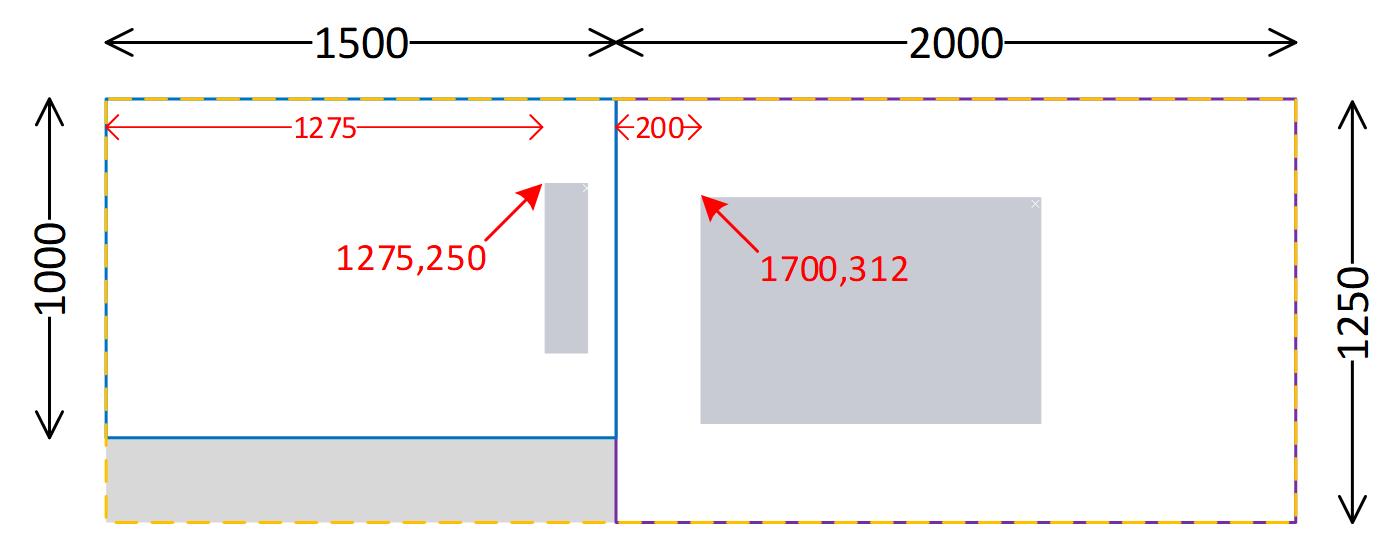
The first (left) window’s left edge: **1275 pixel / 1,5 = 850** WPF units.
The second (right) window’s left edge: **1700 pixel / 2.0 = 850** WPF units.
It is clear that both windows are at different positions on the virtual desktop, but WPF calculates the same position for both windows.
When trying to position the windows programmatically on the screen, things of course go terribly wrong. If the window is already opened, then WPF know the affiliated monitor and will use the scaling factor for that monitor. This will work, unit the window is moved to the other monitor, then the coordinates may jump due to change of scaling factor.
If the window is not opened, then WPF will have to guess on which monitor WPF position **850** is. It iterates the monitors, as explained above. The issue is that the calculations give a position that is valid for both monitors.
• Monitor 1: **850 * 1,5 = 1275**. Monitor has bounds **0..1500**. 1275 is inside the bounds.
• Monitor 2: **850 * 2,0 = 1700**. Monitor has bounds **1500..3500**. 1700 is inside the bounds.
The logic WPF uses is to iterate the monitors in the order in which Windows returns them. Once it finds a monitor that contains the requested coordinates, the search terminates. If it is alphabetically, the search for position 850 will end on monitor 1. This means that **it is impossible to programmatically open a window at the position of the right window on monitor 2**.
### Proposed Solution
I see no easy way to fix **Window.Left** and **Window.Top**. An unfeasible fix is to divide and map the virtual desktop to individual adjacent areas, each having different scaling factor and WPF bounds. How to handle areas not visible on any monitor is unclear.
I propose to take the simple solution and expose an API to position the window directly using screen coordinates.
### Some Additional Challenges
Once a window is opened, positions relative to the window’s top-left corner can be calculated mostly without issue. This means that the relative position of a button compared to the window’s top-left corner can be calculated both ways without issues.
Some issues may exist, as Windows scales the part of the window that is not on the monitor associated with the window according to some internal logic. In the example, the part of the window on monitor 1 may be scaled. This must be tested, especially how mouse or similar coordinates are converted to WPF positions relative to the window’s top-left, as we have little experience with this.

### Related Bugs
https://github.com/dotnet/wpf/issues/3343
https://github.com/dotnet/wpf/issues/3105
Contributor guide
Assessment
This issue has not been assessed yet.