The TreeViewItem cannot stretch correctly
- Dominant language
- C#
- Stars
- 7.7k
- Forks
- 1.3k
- Avg merge
- 1d 11h
- Merged PRs (30d)
- 61
Description
* .NET Core Version: all
* Windows version: all
* Does the bug reproduce also in WPF for .NET Framework 4.8?: Yes
* Is this bug related specifically to tooling in Visual Studio (e.g. XAML Designer, Code editing, etc...)? No.
**Problem description:**
Usually we can reset the style of the ItemContainer for some controls to reset some properties like HorizontalAlignment, but for TreeView, we can not stretch the TreeViewItem by setting the TreeViewItemContainer. We can find quite a few posts regarding this issue, eg:
https://stackoverflow.com/questions/47258955/how-to-stretch-treeviewitem-width-to-fill-parent
https://stackoverflow.com/questions/16374182/background-in-treeviewitem-not-full-width
https://leecampbell.com/2009/01/14/horizontal-stretch-on-treeviewitems/
The reason has been described in the above post. Because the ControlTemplate of the TreeViewItem has a grid with a 3×2 Grid.
The below content is copied from the [post](https://leecampbell.com/2009/01/14/horizontal-stretch-on-treeviewitems/)
> Things to note here is that the layout is controlled with a 3×2 Grid. Now notice that the Border that encapsulates the ContentPresenter (the place holder for where your values will live) is set to live in column 1 (remember 0 based index rules apply here). Also notice that the ItemsPresenter (the place holder for all the children of a TreeViewItem) is set to row 1 and column 1 & 2 (Grid.Column=”1″ Grid.ColumnSpan=”2″). Ok, so now that we know that we look back up to the Grid and notice that the column definitions are such that Column 1 has Width=”Auto” and Column 2 has Width=”*”. This effectively says column 1 can never effectively stretch.
**Actual behavior:**
Even we reset the style of TreeViewItemContainer to make the `HorizontalAlignment` property as `Stretch`, it will not work because the width of third column is `*`.
**Expected behavior:**
The TreeView control should allow users to reset the ItemContainer style to stretch the item.
The reason I raise this issue is for some reason, I need to attach events to the TreeViewItem, eg. tapped, it only works when we click the TextBlock or Image controls in the TreeViewItem. The empty space in the TreeViewItem is not clickable. So we have to find a easy way to make the container to stretch but for this scenario, changing the style of the TreeViewItemContainer will not work.
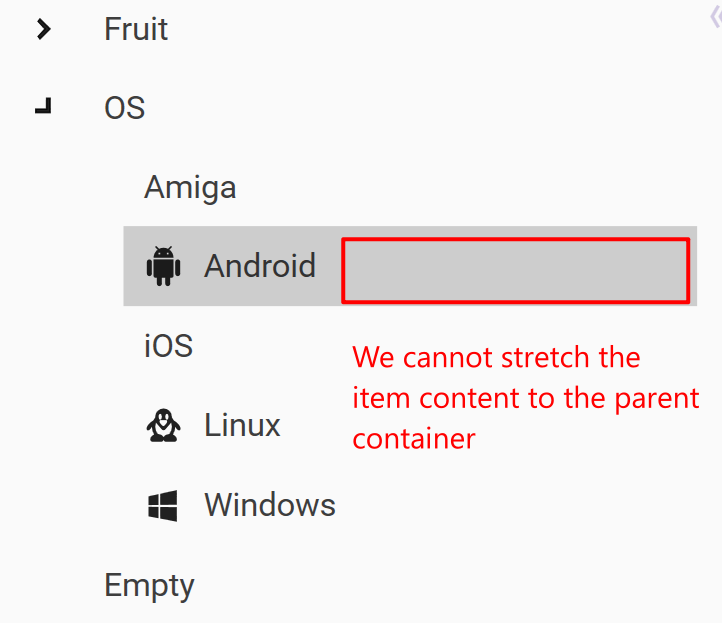
I think the easiest way is to re-design the layout of the ControlTemplate of the TreeView to allow users stretch the item content. eg. remove the third column and set the column width of column 2 as `*`. Not sure if we have better solutions. Thanks.
Contributor guide
Assessment
This issue has not been assessed yet.