Visual Basic shows up twice in All Languages filter on RUS language - Template authoring issue
- Dominant language
- C#
- Stars
- 7.7k
- Forks
- 1.3k
- Avg merge
- 1d 11h
- Merged PRs (30d)
- 61
Description
Copied from [#961245](https://devdiv.visualstudio.com/DevDiv/_workitems/edit/961245)
Visual Basic shows up twice in All Languages filter on RUS language. Duplicate string is not generated by templating engine, but by wpf templates.
**Simplified repro steps:**
Install VS 2019 from master branch with .NET desktop development selected
Open a command prompt and navigate to VS install dir
Run `dir /s *Wpf.Control*` and `dir /s *Wpf.Custom.Control*` to find the folder containing WPF Control VB .NET Core template
Open the ZIP file and check the LanguageTag in the .VSTEMPLATE file
**Expect:** VisualBasic
**Actual:** Visual Basic
There is a related localization bug where Visual Basic in Russian is actually VisualBasic, so template code does not recognize the tag above as the same. The loc bug can be fixed but it is recommended for templates to use built-in tag keywords instead of values to avoid issues like these.
**REPRO MACHINE:** vyuyulrus003 - 172.16.194.209
**REPEO ACCOUNT:** fareast\v-zhomen
**REPRO CONFIGURATION:** Win 10 x64 RS4 RUS+ Dev16.3 Preview 2 (Preview channel : pre-release-build) VSP (Web workload + .Net Desktop workload)
**.NET Core SDK Version:** 3.0.0-preview8-013624
**.NET Core Runtime Version:** 3.0.0-preview8-28380-08
**INSTALL STEPS**
1. Clean machine: Win 10 x64 RS4 RUS
2. Install Dev16.3 Preview 2 VSP
- Install Dev16.3 Preview 2 (master-29131.212) from: https://vsdrop.corp.microsoft.com/file/v1/Products/DevDiv/VS/5270c06f06d4b8b0bb24b1695c1db333c5e5eaec/da710780-2bf3-ee1d-c3ed-1526a0a91f07%3bchannels/internal/Preview/bootstrappers/fixed/Professional/vs_Professional.exe
- Select Web workload + .Net Desktop workload
- Check .NET Core 2.2/2.1 under IC tab
3. Add package feed from: https://dotnetfeed.blob.core.windows.net/dotnet-core-preview8-013624/index.json
**REPRO STEPS**
Open VS > click Create a new project in Get Started > Click All Languages
Visual Basic shows up twice in All Languages filter
**ACTUAL**
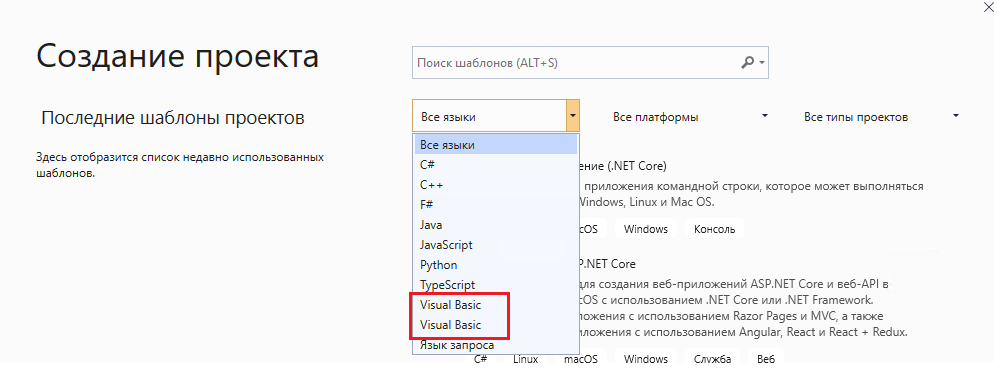
**EXPECT**
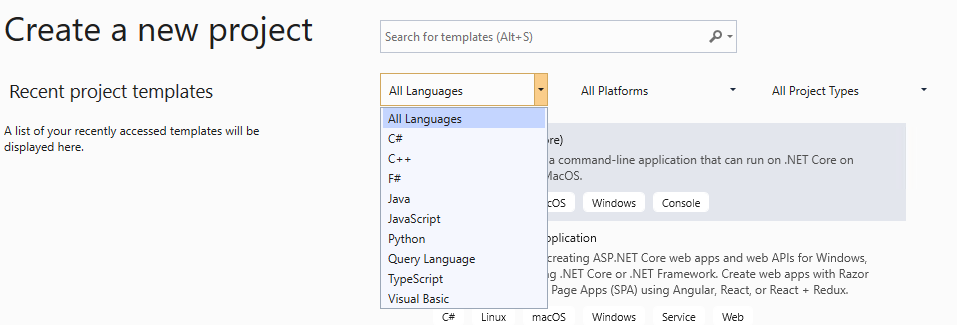
Contributor guide
Assessment
This issue has not been assessed yet.