Japanese kanji characters are not rendered correctly on WPF applications after applied KB4482887.
- Dominant language
- C#
- Stars
- 7.7k
- Forks
- 1.3k
- Avg merge
- 1d 11h
- Merged PRs (30d)
- 61
Description
Copied from OSG AzDO ID: [22130413](https://microsoft.visualstudio.com/OS/_workitems/edit/22130413)
Windows Versions affected: Windows 10 RS5, 19H1
**Issue:**
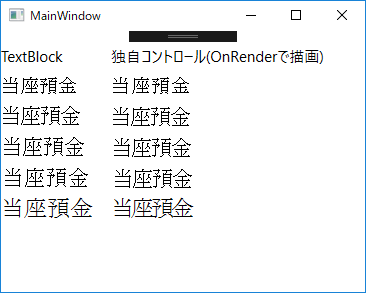
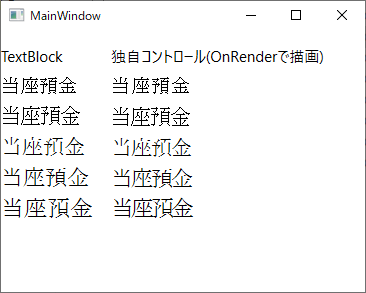
Japanese kanji characters are not rendered correctly on WPF applications after applied KB4482887. Some horizontal lines of kanji characters will disappear.
It is hard to read and recognize what character is displayed.
**Before KB 4482887**
**After KB 4482887**
Repro Steps:
1. Install KB442887
2. Launch WPF application
[20190417_WpfSample.zip](https://github.com/dotnet/wpf/files/3462088/20190417_WpfSample.zip)
Contributor guide
Assessment
This issue has not been assessed yet.