[Multi-Monitor][PerMonitorV2]ToolStripTextBox and ToolStripComBoBox in the toolbar do not scale well when bringing items down from 100% to 300%
- Dominant language
- C#
- Stars
- 4.9k
- Forks
- 1.1k
- Avg merge
- 1d 13m
- Merged PRs (30d)
- 85
Description
### .NET version
8.0.100-alpha.1.22567.28
### Did it work in .NET Framework?
Yes
### Did it work in any of the earlier releases of .NET Core or .NET 5+?
No, it also repro on .NET 6.0 & 7.0.
### Issue description
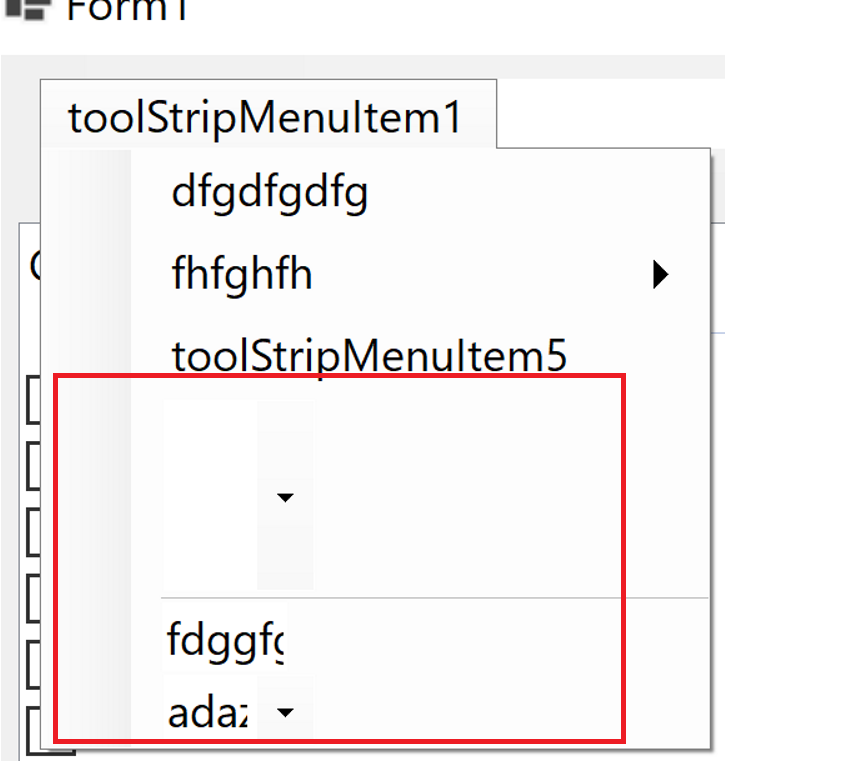
The ToolStripTextBox and ToolStripComBoBox in Toolstrip are not scaled well when moving from 100% primary monitor to 300% secondary monitor.

### Steps to reproduce
1. Launch VS instance on 100% primary screen.
2. Create a WinForms .NET core project.
3. Add PerMonitorV2 in csproj file.
4. Drag and drop a MenuStrip control.
5. Add child controls MenuItem, TextBox, ComboBox respectively
6. Build and run the project.
7. Move to 300% secondary monitor and observe.
**Actual result:**
HScrollBar control is not scaled well when move from 100% primary to 300% secondary monitor.
300% primary monitor:
**Expected result:**
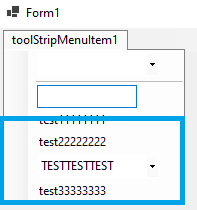
The ToolStripTextBox and ToolStripComBoBox in Toolstrip should be scaled well when move from 100% primary screen to 300% secondary monitor.
**More Info:**
1. This issue also repro on .NET7.0, .NET6.0.
2. This issue doesn't repro on .NET Framework.
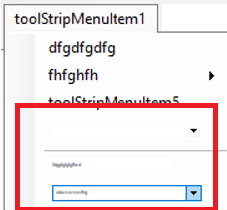
3. ToolStripTextBox and ToolStripComBoBox in the toolbar do not scale well when bringing items down from 300% to 100%,but the result changes.
Contributor guide
Assessment
This issue has not been assessed yet.