OwnerDrawFixed Bounds/DrawString issue.
- Dominant language
- C#
- Stars
- 4.9k
- Forks
- 1.1k
- Avg merge
- 1d 13m
- Merged PRs (30d)
- 85
Description
### .NET version
.NET 6.0.
### Did it work in .NET Framework?
Yes
### Did it work in any of the earlier releases of .NET Core or .NET 5+?
Do not have anything prior to .NET 6.0 installed
### Issue description
In a simple WinForm app I was asked to change the color on some rows in a ListBox. No problem, did it hundreds of times in .NET Framework apps over the years. When I followed the [example ](https://docs.microsoft.com/en-us/dotnet/api/system.windows.forms.drawitemeventargs.bounds?view=windowsdesktop-6.0) I was a little dismayed to see that each row is cut off.
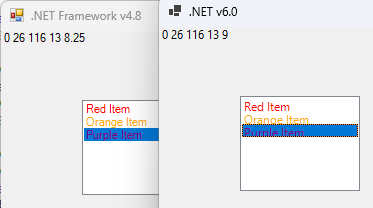
I went ahead and created two new projects(one Framework 4.8, one 6.0) and pasted the exact same sample code in. 4.8 renders fine, 6.0 has each row cut off.
The default font for Framework 4.8 is Microsoft Sans Serif, 8.25pt. The default font for 6.0 is Segoe UI, 9pt.
I added a label to the form and on the DrawItem event I went ahead and filled in the label with the e.Bounds/e.Font.Size. Both the Framework v4.8 and .NET 6.0 contain the exact same e.Bounds.
If they have different fonts, wouldn't the one with a larger font have a larger height for e.Bounds? Even if that's not the case, DrawString appears to be rendering much lower in the bounds, cutting off the bottom of characters.(look at the bottom of the g in Orange and p in Purple.
### Steps to reproduce
Create a new .NET 6.0 WinForm project. View Code for Form1.cs, paste in the contents from https://docs.microsoft.com/en-us/dotnet/api/system.windows.forms.drawitemeventargs.bounds?view=windowsdesktop-6.0
Add InitializeListBox(); to the constructor.
Create a new .NET Framework WinFormproject. Follow the exact same steps.
Contributor guide
Assessment
This issue has not been assessed yet.