WinForms HighDPI PerMonitorV2 ListView ColumnHeader scales wrong
- Dominant language
- C#
- Stars
- 4.9k
- Forks
- 1.1k
- Avg merge
- 20h 23m
- Merged PRs (30d)
- 103
Description
**.NET Core Version:**
SDK: 5.0.203 (383637d63f)
Runtime: 5.0.6 (478b2f8c0e)
**Problem description:**
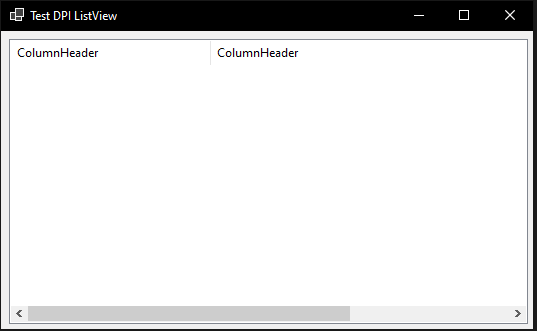
If a ListView is put into View.Detailed mode, the column headers are not scaled when the DPI changes.
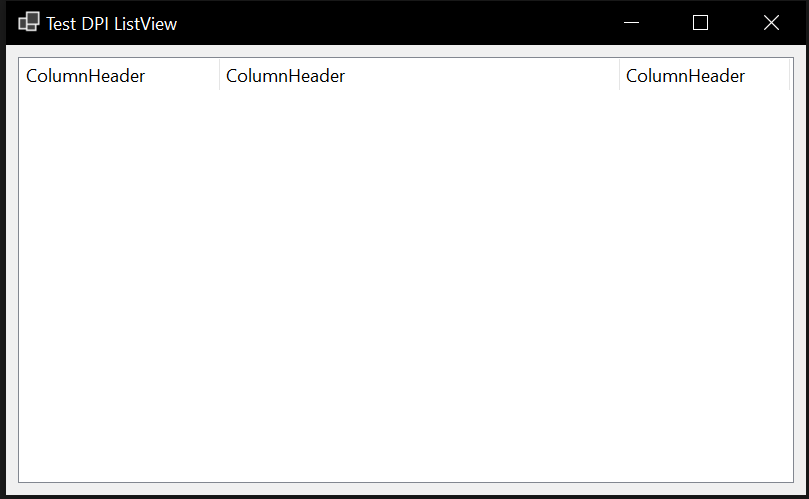
Starting on the main monitor looks correct:
Moving the window to another monitor with different DPI gives the following result:
**Expected behavior:**
The column headers should be scaled as well.
**Minimal repro:**
A sample is attached here:
[TestDpiListView.zip](https://github.com/dotnet/winforms/files/6646533/TestDpiListView.zip)
Contributor guide
Assessment
This issue has not been assessed yet.