Introduce Properties IdleText and IdleTextDelayTime on TextBoxBase and ComboBox
- Dominant language
- C#
- Stars
- 4.9k
- Forks
- 1.1k
- Avg merge
- 1d 13m
- Merged PRs (30d)
- 85
Description
## Rationale:
Usually, there are 2 types of events which are considered to be a Property Change for a Value which has been edited in a TextBox, RichTextBox or ComboBox:
* A User has edited the contents of a TextBox, and moved the focus away from that TextBox.
* A User has changed the Text (so edited or deleted just one character), and while keeping the focus in the TextBox, the Property of the value which the textbox entry represents already is considered to be a change.
In many cases, this is not sufficient:
### Scneario 1: Value Change Expectations in Modern Apps:
In modern apps, a value often counts already as changed, when the user changed the context of the entry box _without_ moving the focus to the next field. Here is a sample of an order page of a modern web app:
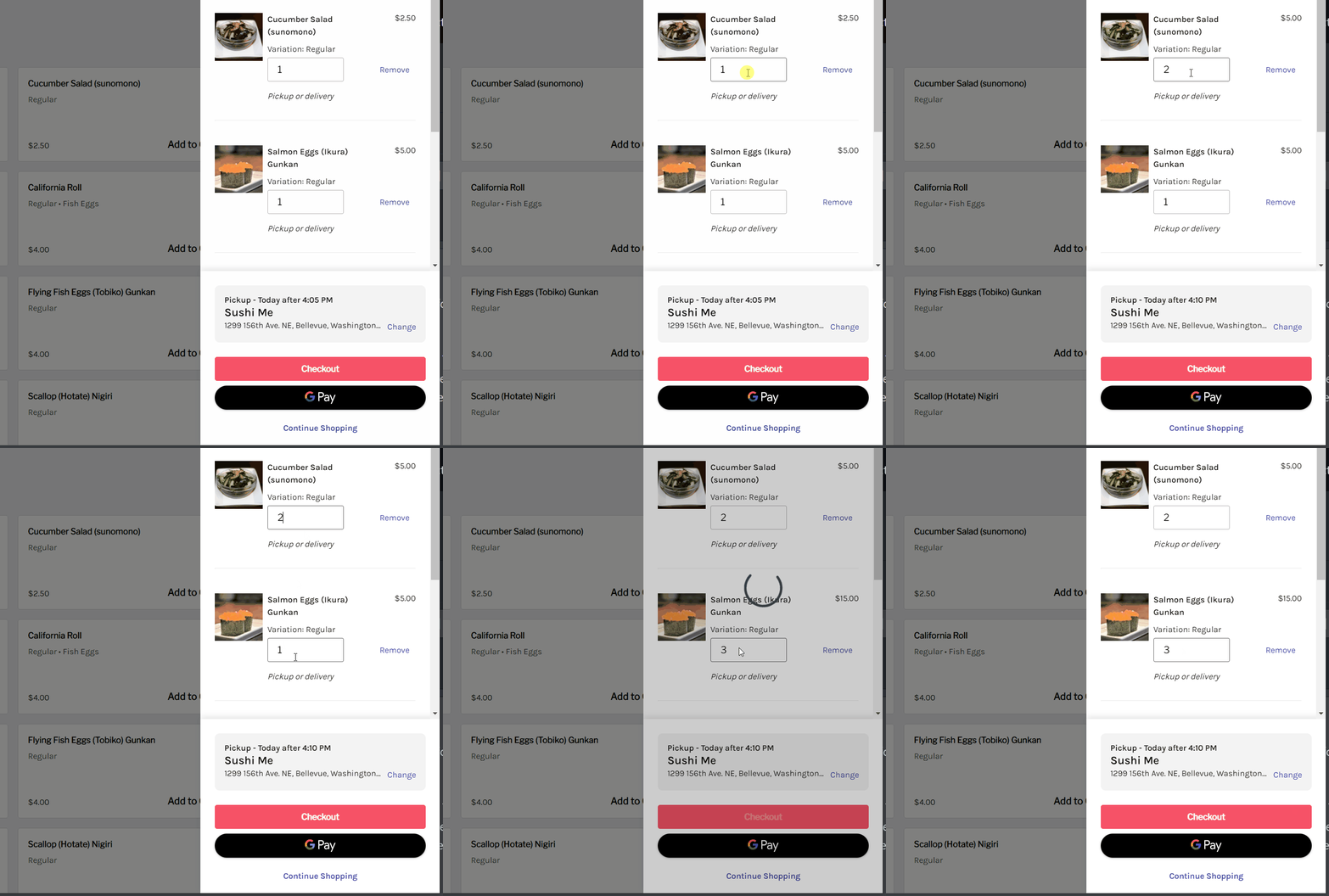
This behavior is becoming more and more typical for Web- or mobile apps.
### Scneario 2: Avoiding performance lags
In search fields, where a large amount of data needs to be filtered based on the entry of a search/filter textbox, filtering only after a lost focus doesn't make sense, while filtering after every key stroke will cause visible lags while typing, which leads to a bad user experience.
## Solution
Introducing a read-only `IdleText` property along with a `protected virtual OnIdleTextChanged` method and an `IdleTextChanged event` would solve these kind of requirements/problems. When the user types in a text, the `IdleText` property will only become updated, when there is an adjustable time-gap between two keystrokes: The changing of the text has to become _idle_ - hence the name of the property. The default value for this gap is setup to 300ms, but can be adjusted with the `IdleTextDelayTime` property.
The result would look like this:
The `IdleText` Property, btw, is necessary, so a DataBinding can be setup on _PropertyChanged_, which would not be possible due to the WinForms DataBinding infrastructure with only keeping the Text property as a BindingSource to the DataSource.
This code:
```
Private Sub TextBox1_IdleTextChanged(sender As Object, e As EventArgs) Handles TextBox1.IdleTextChanged
Label1.Text = TextBox1.IdleText
End Sub
```
would have this result:

Contributor guide
Assessment
This issue has not been assessed yet.